Contact
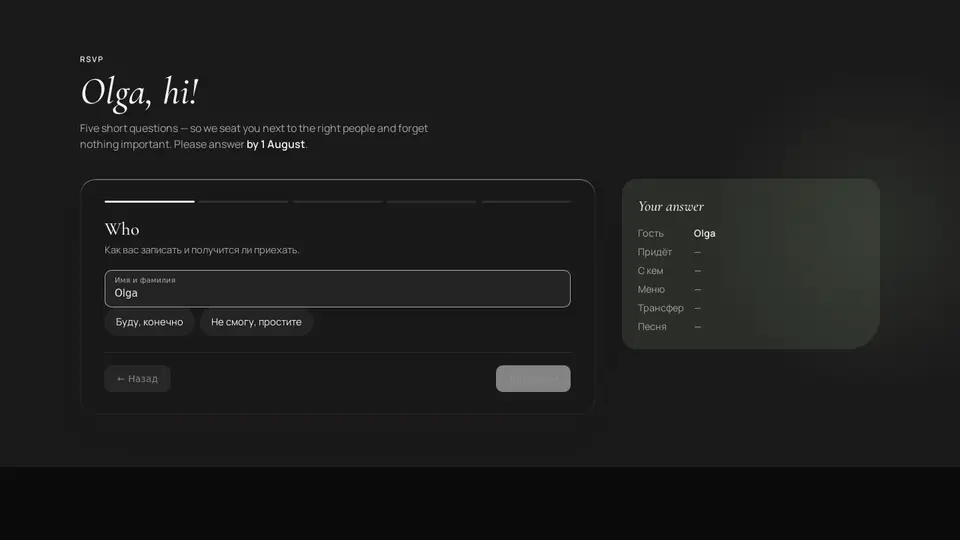
Five-step wedding RSVP form
An RSVP in five steps: who and whether they're coming, with whom (plus one, children), menu and drinks with allergies, whether a shuttle is needed, a dance-floor song and a wish. Progress bars on top, a sticky summary on the right that fills as you go, and a “thank you” finale with a wax seal. The guest's name comes from ?guest= in the URL — the link can be sent personally.
React + Tailwind, shadcn-compatible: press “Copy for AI” and your Cursor or Claude Code agent installs it with the shadcn CLI.
What you can change
- eyebrow, title, greeting ({name}), lede ({deadline}), deadline, guest, stepLabels
- menu, drinks (value/label), summaryTitle, submitLabel, thanksTitle, thanksText, action
- accent and background, tone
Built from
The install command brings these components too. The block only passes them props: their palette and behaviour stay their own.
A link for your AI agent: preview, code and instructions.
Preview
Use it with AI
- 1. Copy the link.
- 2. Write to your agent in your own words and drop the link into the sentence.
- 3. The agent opens the link and installs the component from the registry.
put this on the home page as the hero:
https://vibeui.club/c/contact-018?lang=en&theme=dark
Not sure where to paste it? Step-by-step guide
Show the full instructions
What the link says, spelled out. Use it when your agent cannot open links — paste this text instead.
Loading…
How to use
<Contact018
  title="Tell us you're coming"
  greeting="{name}, hi!"
  deadline="by 1 August"
  menu={[
    { value: "meat", label: "Meat" },
    { value: "fish", label: "Fish" },
    { value: "veg", label: "Vegetarian" },
  ]}
  drinks={[
    { value: "wine", label: "Wine" },
    { value: "none", label: "No alcohol" },
  ]}
  action="/api/rsvp"
/>
{/* personal link: /?guest=Olga#rsvp */}
A sample call. The agent installs the component itself from the registry via the “Copy for AI” link.
Settings
- Title
title· default: Tell us you're coming- Guest name
guest- Deadline
deadline· default: by 1 August- Theme
tone· default: auto- Accent
accent· default: theme colour- Background
background· default: theme colour
Used in scenarios
More in Contact
FAQ
- How do I add Five-step wedding RSVP form with Cursor or Claude Code?
- Press “Copy for AI” on this page and paste it into your agent's chat. The instruction contains the shadcn CLI install command, the dependencies and what to keep, so the agent installs this exact component instead of recreating a lookalike.
- What does Five-step wedding RSVP form depend on?
- No npm packages beyond React and Tailwind CSS. It also installs catalog components: input-001, input-034, button-001.
- What can I change in Five-step wedding RSVP form?
- Adapt: eyebrow, title, greeting ({name}), lede ({deadline}), deadline, guest, stepLabels; menu, drinks (value/label), summaryTitle, submitLabel, thanksTitle, thanksText, action; accent and background, tone. Keep as installed: the input-001, input-034, button-001 imports from @/components/vibeui/ — do not inline their code into the block or swap in your own; the parts receive props only; five steps shown one at a time with progress bars and “Next” disabled until answered; the sticky summary on the right that fills as you go.
- Is Five-step wedding RSVP form free?
- The preview is open to everyone; the source is available with a PRO subscription.
For developers
npx shadcn@latest add https://vibeui.club/r/pro/contact-018.jsonThis command needs a signed link: sign in and open “Component source” below — it issues a working link valid for 30 minutes. All install options
Technical notes
A composite block: imports input-001, input-034, button-001 from @/components/vibeui/ — the install command brings them along with the block. The block owns the layout and its own text, passes the parts props only and leaves their --vibeui-<name>-* palettes alone. One file, zero npm dependencies, “use client”. State is the answers object and the step index; steps render one at a time with a fade-in, “Next” on the first step is disabled without a name and a yes/no. Choices are pill buttons with aria-pressed (single) and role=checkbox/aria-checked (drinks). The name from the URL is read via useSyncExternalStore (empty on the server, hydration without mismatch); greeting with {name} replaces the title; lede accepts {deadline}. The form is glass: translucent cream with backdrop-filter and a light edge, with a sage ::before glow of the section behind it. The summary is a <dl> with aria-live=polite, empty values show “—”. Submission: without action — preventDefault and the “thank you” screen; with action — a plain POST with hidden guest and answers (JSON) fields. The seal is a radial-gradient with a “stamp” keyframe. From 56rem a 1.4fr/.7fr grid, the summary sticky. Palette --vibeui-contact-018-* is neutral: ink and paper via light-dark(), the site colours come through the accent, ink and background props; dark theme via .dark/[data-theme] or tone. Cormorant Garamond and Manrope come via <link precedence> from Google Fonts with Georgia and system fallbacks. accent and background override colours, prefers-reduced-motion disables animations.
Tags
- wedding
- rsvp
- form
- multi-step
- wizard
- survey
- poll
- menu
- guests
- plus one
- transfer
- song request
- serif
- cream
- composite
Component source
The same file your agent installs. Here in case you would rather copy it by hand.
Loading…