CTA
Final call with flip clock and glow
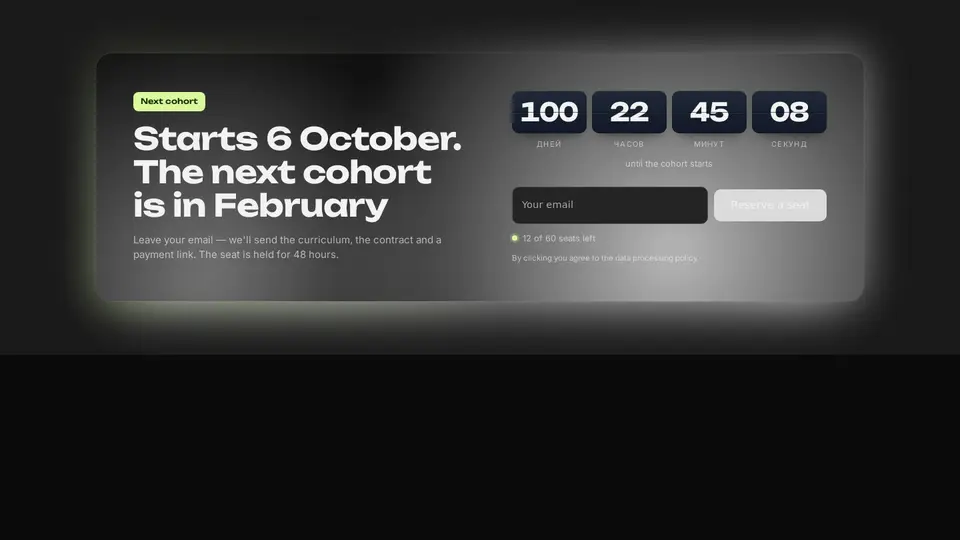
The course's final call: a dark card in a coloured halo — a conic glow behind the card and two drifting spots inside, a countdown as a flip clock (days, hours, minutes, seconds flip on the X axis), a “seats left” tag, a form with email and a button. With action it POSTs, without it shows “your seat is reserved”.
React + Tailwind, shadcn-compatible: press “Copy for AI” and your Cursor or Claude Code agent installs it with the shadcn CLI.
What you can change
- eyebrow, title, text, startsAt (ISO), countdownLabel, seats, placeholder, submitLabel, doneTitle, doneText, consent
- action — where to submit; without it done is shown
- accent and background, tone
Built from
The install command brings these components too. The block only passes them props: their palette and behaviour stay their own.
A link for your AI agent: preview, code and instructions.
Preview
Use it with AI
- 1. Copy the link.
- 2. Write to your agent in your own words and drop the link into the sentence.
- 3. The agent opens the link and installs the component from the registry.
put this on the home page as the hero:
https://vibeui.club/c/cta-017?lang=en&theme=dark
Not sure where to paste it? Step-by-step guide
Show the full instructions
What the link says, spelled out. Use it when your agent cannot open links — paste this text instead.
Loading…
How to use
<Cta017
  title="Starts 6 October. The next cohort is in February"
  startsAt="2026-10-06T10:00:00+03:00"
  seats="12 of 60 seats left"
  submitLabel="Reserve a seat"
  action="/api/enroll"
/>
A sample call. The agent installs the component itself from the registry via the “Copy for AI” link.
Settings
- Theme
tone· default: auto- Title
title· default: Starts 6 October. The next cohort is in February- Seats
seats· default: 12 of 60 seats left- Accent
accent· default: theme colour- Background
background· default: theme colour
Used in scenarios
- Online courseEnrolment
More in CTA
FAQ
- How do I add Final call with flip clock and glow with Cursor or Claude Code?
- Press “Copy for AI” on this page and paste it into your agent's chat. The instruction contains the shadcn CLI install command, the dependencies and what to keep, so the agent installs this exact component instead of recreating a lookalike.
- What does Final call with flip clock and glow depend on?
- No npm packages beyond React and Tailwind CSS. It also installs catalog components: input-001, button-001.
- What can I change in Final call with flip clock and glow?
- Adapt: eyebrow, title, text, startsAt (ISO), countdownLabel, seats, placeholder, submitLabel, doneTitle, doneText, consent; action — where to submit; without it done is shown; accent and background, tone. Keep as installed: the input-001, button-001 imports from @/components/vibeui/ — do not inline their code into the block or swap in your own; the parts receive props only; the flip clock: tiles flip on the X axis rather than merely changing the figure; the conic halo behind the card and the drifting spots inside.
- Is Final call with flip clock and glow free?
- The preview is open to everyone; the source is available with a PRO subscription.
For developers
npx shadcn@latest add https://vibeui.club/r/pro/cta-017.jsonThis command needs a signed link: sign in and open “Component source” below — it issues a working link valid for 30 minutes. All install options
Technical notes
A composite block: imports input-001, button-001 from @/components/vibeui/ — the install command brings them along with the block. The block owns the layout and its own text, passes the parts props only and leaves their --vibeui-<name>-* palettes alone. One file, zero npm dependencies, “use client” for the timer and the form. Time is read only on the client (useEffect + setInterval every second); on the server the timer renders zeros with aria-hidden — no hydration mismatch. Each figure is a span keyed by value inside a tile with perspective:600px: a change remounts it with @keyframes rotateX(-80deg)→0, the middle line is an ::after. The halo is the wrap's ::before with inset:-.5rem, conic-gradient(from var(--a)) and blur(28px), the angle an @property <angle> over 14 s; the spots are the card's ::before/::after with blur and a drift @keyframes. The form: <input type=email name=email required>, a submit button; with an empty action submit is intercepted and done is shown. From 60rem (container query) two columns 1.1fr/1fr. Palette --vibeui-cta-017-* is neutral: ink and paper via light-dark(), the site colours come through the accent, ink and background props; Unbounded and Inter via <link precedence> from Google Fonts with system fallbacks. tone pins the scheme, accent, ink and background override colours.
Tags
- course
- education
- edtech
- landing
- cta
- countdown
- timer
- flip
- form
- glow
- composite
Component source
The same file your agent installs. Here in case you would rather copy it by hand.
Loading…