Cursors
ASCII fluid cursor
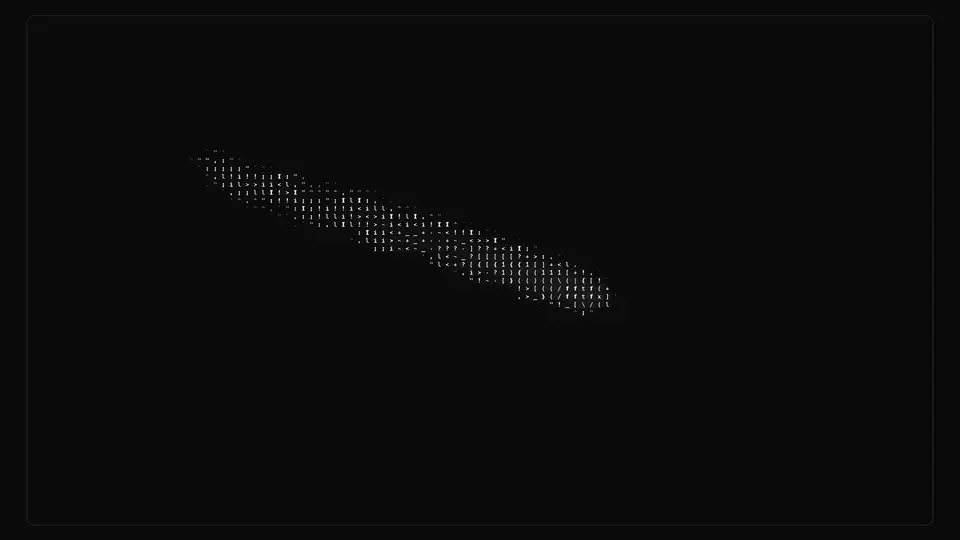
A field of ASCII characters where a cloud spreads behind the cursor: a real fluid runs underneath — splat, advection, pressure — and its density picks the character.
React + Tailwind, shadcn-compatible: press “Copy for AI” and your Cursor or Claude Code agent installs it with the shadcn CLI.
What you can change
- color and backgroundColor — ink and paper, if the component palette does not fit
- cellSize — the size of one character cell, that is the ASCII grain
- force, dissipation, brush — splat strength, trail length and brush radius
A link for your AI agent: preview, code and instructions.
Preview
Use it with AI
- 1. Copy the link.
- 2. Write to your agent in your own words and drop the link into the sentence.
- 3. The agent opens the link and installs the component from the registry.
put this on the home page as the hero:
https://vibeui.club/c/cursor-001?lang=en&theme=dark
Not sure where to paste it? Step-by-step guide
Show the full instructions
What the link says, spelled out. Use it when your agent cannot open links — paste this text instead.
Loading…
How to use
<Cursor001 cellSize={12} dissipation={0.05} brush={0.55} />A sample call. The agent installs the component itself from the registry via the “Copy for AI” link.
Settings
- Ink colour
color· default: #121212- Paper colour
backgroundColor· default: #ffffff- Character cell
cellSize· default: 12- Trail decay
dissipation· default: 0.05- Brush radius
brush· default: 0.55- Splat strength
force· default: 1- Idle drift
animate· default: on- Character ramp
charset· default: .'`^",:;Il!i><~+_-?][}{1)(|\/tfjrxnuvczXYUJCLQ0OZmwqpdbkhao*#MW&8%B@$
More in Cursors
FAQ
- How do I add ASCII fluid cursor with Cursor or Claude Code?
- Press “Copy for AI” on this page and paste it into your agent's chat. The instruction contains the shadcn CLI install command, the dependencies and what to keep, so the agent installs this exact component instead of recreating a lookalike.
- What does ASCII fluid cursor depend on?
- No npm packages beyond React and Tailwind CSS.
- What can I change in ASCII fluid cursor?
- Adapt: color and backgroundColor — ink and paper, if the component palette does not fit; cellSize — the size of one character cell, that is the ASCII grain; force, dissipation, brush — splat strength, trail length and brush radius. Keep as installed: the local --vibeui-cursor-001-* palette — do not swap it for your theme tokens (bg-background, text-foreground and the like); the order of simulation steps per frame: splat → velocity advection → divergence → pressure iterations → gradient subtraction → dye advection; reordering breaks the fluid; packing velocity and pressure into 0…1 with the enc/dec pair — without it you need float textures, which some devices lack.
- Is ASCII fluid cursor free?
- The preview is open to everyone; the source is available with a PRO subscription.
For developers
npx shadcn@latest add https://vibeui.club/r/pro/cursor-001.jsonThis command needs a signed link: sign in and open “Component source” below — it issues a working link valid for 30 minutes. All install options
Technical notes
Self-contained: one file, zero dependencies, palette in local --vibeui-cursor-001-* variables. Picks up the theme through light-dark() plus a rule for the .dark class. Inside runs a WebGL fluid simulation following stable fluids: velocity and dye splats at the cursor, advection, divergence, 14 Jacobi pressure iterations, gradient subtraction, dye advection. The fields live in six 180×180 textures and do not depend on the block size; cellSize only sets how coarse the ASCII grain is. Velocity is packed into an RGBA texture with an enc/dec pair, so no float extensions are needed and plain webgl1 is enough. The character is picked by dye density from a glyph atlas drawn once on a 2D canvas. Ink and paper colours are read from empty probe nodes: the shader needs numbers, while the CSS variables hold light-dark(). While the cursor is outside, the field stirs itself (animate) so the catalog card is never dead. Under prefers-reduced-motion the simulation is not stepped and the flicker is off.
Tags
- cursor
- ascii
- fluid
- webgl
- shader
- trail
- pointer
- interactive
- animated
Component source
The same file your agent installs. Here in case you would rather copy it by hand.
Loading…