Cursors
Designer's Crosshair
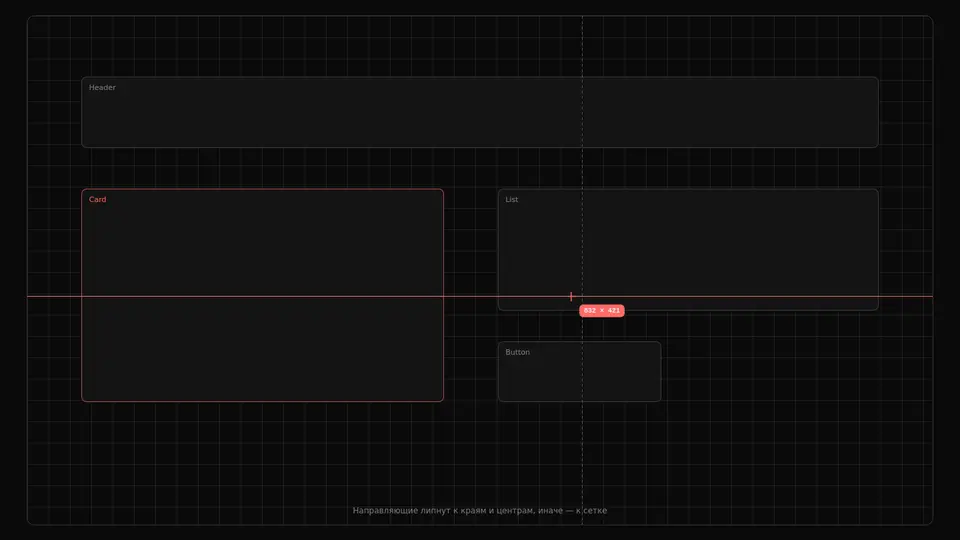
A crosshair across the whole frame, coordinates beside the cursor and guides that stick to the edges and centres of elements — and to the grid step when none is near.
React + Tailwind, shadcn-compatible: press “Copy for AI” and your Cursor or Claude Code agent installs it with the shadcn CLI.
What you can change
- nodes — the layout elements: label and box in fractions of the frame
- grid — the grid step in pixels
- snap — the snapping radius to an edge
A link for your AI agent: preview, code and instructions.
Preview
Use it with AI
- 1. Copy the link.
- 2. Write to your agent in your own words and drop the link into the sentence.
- 3. The agent opens the link and installs the component from the registry.
put this on the home page as the hero:
https://vibeui.club/c/cursor-003?lang=en&theme=dark
Not sure where to paste it? Step-by-step guide
Show the full instructions
What the link says, spelled out. Use it when your agent cannot open links — paste this text instead.
Loading…
How to use
<Cursor003 grid={24} snap={12} nodes={[{ label: "Header", box: [0.06, 0.12, 0.88, 0.14] }]} />A sample call. The agent installs the component itself from the registry via the “Copy for AI” link.
Settings
- Grid step
grid· default: 32- Snap radius
snap· default: 10- Accent
accent· default: theme colour- Pointer reaction
interactive· default: on
More in Cursors
FAQ
- How do I add Designer's Crosshair with Cursor or Claude Code?
- Press “Copy for AI” on this page and paste it into your agent's chat. The instruction contains the shadcn CLI install command, the dependencies and what to keep, so the agent installs this exact component instead of recreating a lookalike.
- What does Designer's Crosshair depend on?
- No npm packages beyond React and Tailwind CSS.
- What can I change in Designer's Crosshair?
- Adapt: nodes — the layout elements: label and box in fractions of the frame; grid — the grid step in pixels; snap — the snapping radius to an edge. Keep as installed: the local --vibeui-cursor-003-* palette — do not swap it for your theme tokens; snapping to centres as well as edges: layouts align to the centre no less often; the grid as the fallback: a free coordinate is almost always an accident.
- Is Designer's Crosshair free?
- The preview is open to everyone; the source is available with a PRO subscription.
For developers
npx shadcn@latest add https://vibeui.club/r/pro/cursor-003.jsonThis command needs a signed link: sign in and open “Component source” below — it issues a working link valid for 30 minutes. All install options
Technical notes
The cursor here is a tool rather than decoration: the native cursor is hidden and replaced by a cross, two guides spanning the frame and a chip with the coordinates. On every move the distance to every element edge is measured — left, right and centre on each axis; the nearest one within the snap radius takes the guide over, the guide turns solid and accented, and the element lights up. While no edge is near, the coordinate settles on the grid step: a free value in a layout is almost always an accident rather than a decision. A separate bar draws the measurement — the distance from the real position of the hand to the edge the crosshair snapped to. Everything is computed in the move handler, with no animation loop: between cursor moves the picture has no reason to change. The theme comes from the surroundings through light-dark().
Tags
- cursor
- crosshair
- guides
- snapping
- design-tool
- pointer
- grid
- measure
Component source
The same file your agent installs. Here in case you would rather copy it by hand.
Loading…