About
Couple's route: a flight line with a plane and stops
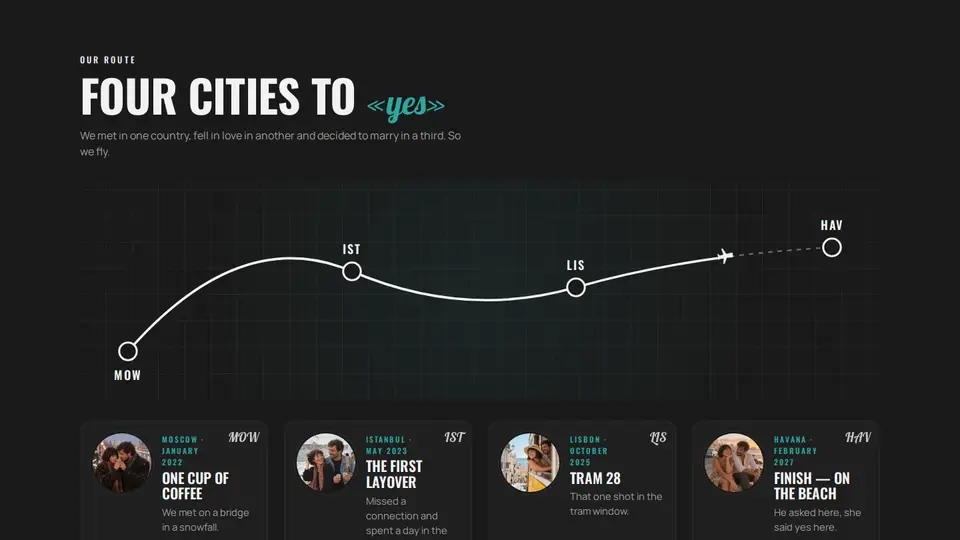
“Our route” like a map in an in-flight magazine: a dashed flight line through four stops with city-code pins; a plane travels the line and draws the covered part as the section scrolls. Under the line, stop cards with a round photo, a date and a story; clicking a pin highlights its card.
React + Tailwind, shadcn-compatible: press “Copy for AI” and your Cursor or Claude Code agent installs it with the shadcn CLI.
What you can change
- eyebrow, title (the part in «quotes» turns handwritten), lede
- stops — exactly four: code, city, date, title, text, image
- accent and background, tone
Built from
The install command brings these components too. The block only passes them props: their palette and behaviour stay their own.
A link for your AI agent: preview, code and instructions.
Preview
Use it with AI
- 1. Copy the link.
- 2. Write to your agent in your own words and drop the link into the sentence.
- 3. The agent opens the link and installs the component from the registry.
put this on the home page as the hero:
https://vibeui.club/c/about-012?lang=en&theme=dark
Not sure where to paste it? Step-by-step guide
Show the full instructions
What the link says, spelled out. Use it when your agent cannot open links — paste this text instead.
Loading…
How to use
<About012
  title="Four cities to «yes»"
  stops={[
    { code: "MOW", city: "Moscow", date: "January 2022", title: "One cup of coffee", text: "We met on a bridge.", image: "/photos/route-01.webp" },
    { code: "IST", city: "Istanbul", date: "May 2023", title: "The first layover", text: "A day in the city.", image: "/photos/route-02.webp" },
    { code: "LIS", city: "Lisbon", date: "October 2025", title: "Tram 28", text: "That one shot.", image: "/photos/route-03.webp" },
    { code: "HAV", city: "Havana", date: "February 2027", title: "Finish", text: "Where we marry.", image: "/photos/route-04.webp" },
  ]}
/>
A sample call. The agent installs the component itself from the registry via the “Copy for AI” link.
Settings
- Title
title· default: Four cities to “yes”- Theme
tone· default: auto- Accent
accent· default: theme colour- Background
background· default: theme colour
Used in scenarios
- Wedding in CubaRoute
More in About
- Couple's story as a garland: bulbs light up on scroll
- “About me” with a B/W → colour photo, facts and skills
- About the workshop: a taped collage, a drop cap and florist polaroids
- Numbers as neon rings with counters
- Community: count-up numbers and a contributors wall
- Instrument panel: SVG arcs and figures that count up in the viewport
FAQ
- How do I add Couple's route: a flight line with a plane and stops with Cursor or Claude Code?
- Press “Copy for AI” on this page and paste it into your agent's chat. The instruction contains the shadcn CLI install command, the dependencies and what to keep, so the agent installs this exact component instead of recreating a lookalike.
- What does Couple's route: a flight line with a plane and stops depend on?
- No npm packages beyond React and Tailwind CSS. It also installs catalog components: card-131.
- What can I change in Couple's route: a flight line with a plane and stops?
- Adapt: eyebrow, title (the part in «quotes» turns handwritten), lede; stops — exactly four: code, city, date, title, text, image; accent and background, tone. Keep as installed: the card-131 imports from @/components/vibeui/ — do not inline their code into the block or swap in your own; the parts receive props only; the dashed flight line with code pins and the plane travelling it on scroll; the covered part of the line drawn in solid accent.
- Is Couple's route: a flight line with a plane and stops free?
- The preview is open to everyone; the source is available with a PRO subscription.
For developers
npx shadcn@latest add https://vibeui.club/r/pro/about-012.jsonThis command needs a signed link: sign in and open “Component source” below — it issues a working link valid for 30 minutes. All install options
Technical notes
A composite block: imports card-131 from @/components/vibeui/ — the install command brings them along with the block. The block owns the layout and its own text, passes the parts props only and leaves their --vibeui-<name>-* palettes alone. One file, zero npm dependencies, “use client” for the progress and pins. The line is an SVG viewBox 1000×260 with a path of T-segments: the segment ends are exactly the stop points, so pins sit on the curve. The plane is a path with offset-path:path(...) and offset-distance from --vibeui-about-012-p; the covered part is a second path with pathLength=1 and stroke-dashoffset from --vibeui-about-012-k. Both variables are written by an rAF scroll handler from the section's position in the window (0 entering from below, 1 once the centre has passed), without re-renders. Pins are <g role=button tabIndex> with data-active, [data-part=stop] cards highlight with a border and lift. The card grid is 4 per row from 56rem. Exactly four stops: extras are dropped. Palette --vibeui-about-012-* is neutral: ink and paper via light-dark(), the site colours come through the accent, ink and background props; dark theme via .dark/[data-theme] or tone. Oswald, Lobster and Manrope come via <link precedence> from Google Fonts with system fallbacks. accent and background override colours, prefers-reduced-motion disables animations.
Tags
- wedding
- travel
- route
- map
- flight path
- plane
- scroll
- offset-path
- timeline
- story
- couple
- retro
- composite
Component source
The same file your agent installs. Here in case you would rather copy it by hand.
Loading…