Layouts
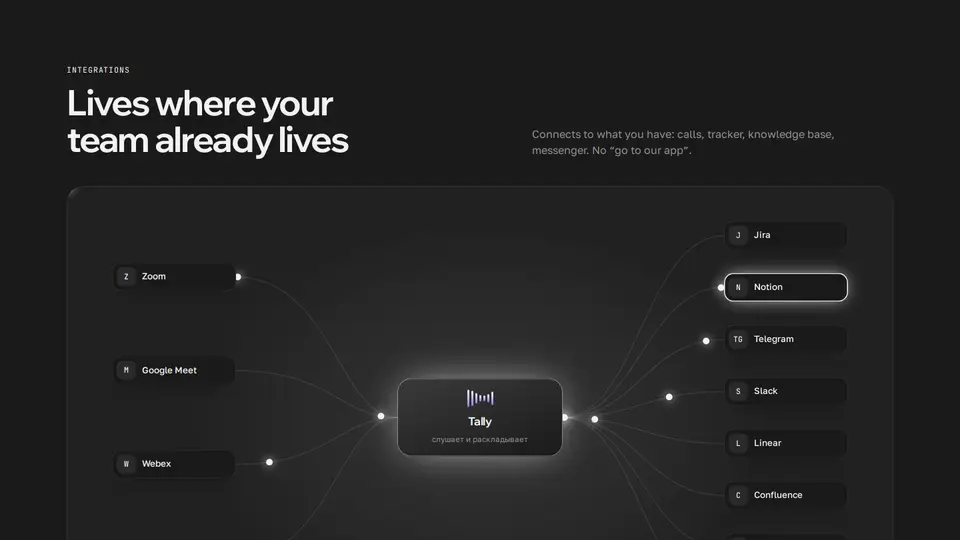
Integrations as a router: inputs → product core → outputs, packets run along the wires
An integrations section as a diagram: inputs on the left (call services), the product core with an equalizer in the centre, outputs on the right — trackers, messengers, knowledge bases. Everything is joined by smooth curves with glowing packets running along them, an output flashes when a packet arrives. Hovering a service highlights its route. A title and lede on top, facts in four columns below. On narrow screens the services keep only their marks. Service logos are the official ones from Simple Icons (CC0), embedded in the block.
React + Tailwind, shadcn-compatible: press “Copy for AI” and your Cursor or Claude Code agent installs it with the shadcn CLI.
What you can change
- eyebrow, title, lede, core — the name in the centre, coreCaption
- inner (inputs), outer (outputs): name, brand (zoom, googlemeet, vk, webex, jira, notion, telegram, linear, confluence, trello) or your own icon (24×24 path) and color, mark — letters when there is no logo
- speed — seconds per packet pass; facts — «Title: text»
A link for your AI agent: preview, code and instructions.
Preview
Use it with AI
- 1. Copy the link.
- 2. Write to your agent in your own words and drop the link into the sentence.
- 3. The agent opens the link and installs the component from the registry.
put this on the home page as the hero:
https://vibeui.club/c/bento-002?lang=en&theme=dark
Not sure where to paste it? Step-by-step guide
Show the full instructions
What the link says, spelled out. Use it when your agent cannot open links — paste this text instead.
Loading…
How to use
<Bento002
  core="Tally"
  coreCaption="listens and files"
  inner={[{ name: "Zoom", brand: "zoom" }, { name: "Meet", brand: "googlemeet" }]}
  outer={[{ name: "Jira", brand: "jira" }, { name: "Notion", brand: "notion" }, { name: "Telegram", brand: "telegram" }]}
/>
A sample call. The agent installs the component itself from the registry via the “Copy for AI” link.
Settings
- Core
core· default: Tally- Seconds per turn
speed· default: 2.4- Theme
tone· default: auto- Accent
accent· default: theme colour- Ink
ink· default: theme colour- Background
background· default: theme colour
Used in scenarios
- AI tool / SaaSIntegrations
More in Layouts
- “How lessons work” bento: a lesson timeline, a photo and live tiles
- Bank features in a bento grid with a micro-animation in every tile
- Authors bento: counting numbers, a payout calendar, a purchases ticker
- API endpoints as bento tiles with CSS micro-demos
- Gadget features bento: an equalizer, sensor rings, a CSS phone
- About as a bento: portrait, counting numbers, cities and a draft
FAQ
- How do I add Integrations as a router: inputs → product core → outputs, packets run along the wires with Cursor or Claude Code?
- Press “Copy for AI” on this page and paste it into your agent's chat. The instruction contains the shadcn CLI install command, the dependencies and what to keep, so the agent installs this exact component instead of recreating a lookalike.
- What does Integrations as a router: inputs → product core → outputs, packets run along the wires depend on?
- No npm packages beyond React and Tailwind CSS.
- What can I change in Integrations as a router: inputs → product core → outputs, packets run along the wires?
- Adapt: eyebrow, title, lede, core — the name in the centre, coreCaption; inner (inputs), outer (outputs): name, brand (zoom, googlemeet, vk, webex, jira, notion, telegram, linear, confluence, trello) or your own icon (24×24 path) and color, mark — letters when there is no logo; speed — seconds per packet pass; facts — «Title: text». Keep as installed: the diagram is one SVG viewBox 1000×560 with preserveAspectRatio none, the tiles sit on top in the same fractions — wires and tiles line up; packets are circles with animateMotion along a path via mpath, begin shifted by index; an output flashes with the hit keyframes at the same delay; hovering a tile sets hot — its path and tile light up in the accent.
- Is Integrations as a router: inputs → product core → outputs, packets run along the wires free?
- The preview is open to everyone; the source is available with a PRO subscription.
For developers
npx shadcn@latest add https://vibeui.club/r/pro/bento-002.jsonThis command needs a signed link: sign in and open “Component source” below — it issues a working link valid for 30 minutes. All install options
Tags
- bento
- integrations
- logos
- services
- connect
- saas
- ai
- animation
- router
- flow
- diagram
- packets
- hub
Component source
The same file your agent installs. Here in case you would rather copy it by hand.
Loading…