Layouts
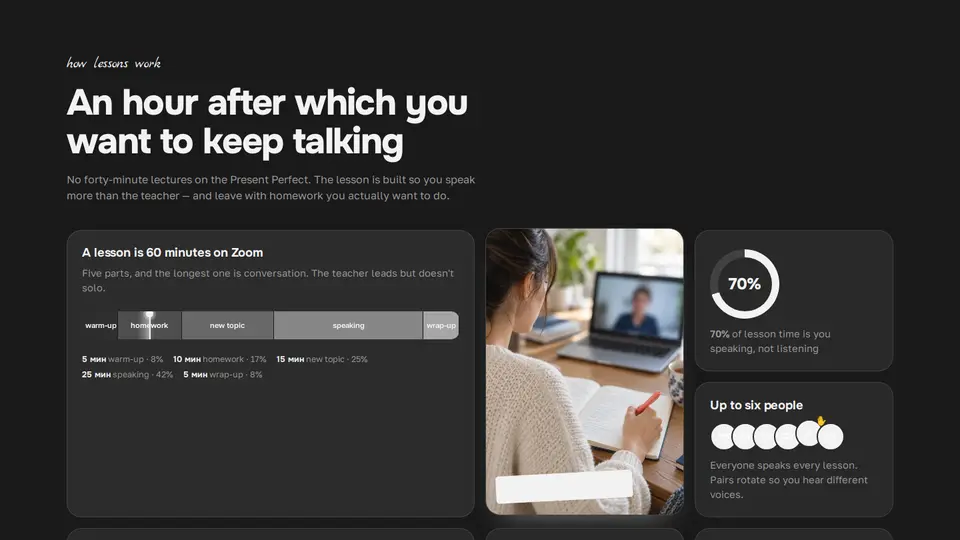
“How lessons work” bento: a lesson timeline, a photo and live tiles
Seven tiles of different sizes about the lesson format: a big one with a lesson timeline of coloured segments and a glowing needle drifting across it (each segment flashes the instant the needle reaches it); a tall one with a photo and a handwritten sticker caption; a “70% is you speaking” ring on conic-gradient; six student circles, one raising a hand; a ruled sheet where the homework writes itself line by line (clip-path); native-speaker chips; a list of “what stays after the lesson”. All CSS.
React + Tailwind, shadcn-compatible: press “Copy for AI” and your Cursor or Claude Code agent installs it with the shadcn CLI.
What you can change
- eyebrow, title, lede, image, imageAlt, imageCaption
- lessonTitle, lessonText, segments: label, minutes
- groupTitle, groupText, group; speakShare, speakText; homeworkTitle, homework; nativeTitle, nativeText, natives; recordTitle, records
A link for your AI agent: preview, code and instructions.
Preview
Use it with AI
- 1. Copy the link.
- 2. Write to your agent in your own words and drop the link into the sentence.
- 3. The agent opens the link and installs the component from the registry.
put this on the home page as the hero:
https://vibeui.club/c/bento-008?lang=en&theme=dark
Not sure where to paste it? Step-by-step guide
Show the full instructions
What the link says, spelled out. Use it when your agent cannot open links — paste this text instead.
Loading…
How to use
<Bento008
  title="An hour after which you want to keep talking"
  image="/photos/lesson.webp"
  segments={[{ label: "warm-up", minutes: 5 }, { label: "speaking", minutes: 25 }]}
  speakShare={70}
/>
A sample call. The agent installs the component itself from the registry via the “Copy for AI” link.
Settings
- Title
title· default: An hour after which you want to keep talking- Speaking share, %
speakShare· default: 70- Theme
tone· default: auto- Accent
accent· default: theme colour- Ink
ink· default: theme colour- Background
background· default: theme colour
Used in scenarios
- Language schoolHow lessons go
More in Layouts
- Bank features in a bento grid with a micro-animation in every tile
- Authors bento: counting numbers, a payout calendar, a purchases ticker
- API endpoints as bento tiles with CSS micro-demos
- Gadget features bento: an equalizer, sensor rings, a CSS phone
- About as a bento: portrait, counting numbers, cities and a draft
- Typographic interlude spread
FAQ
- How do I add “How lessons work” bento: a lesson timeline, a photo and live tiles with Cursor or Claude Code?
- Press “Copy for AI” on this page and paste it into your agent's chat. The instruction contains the shadcn CLI install command, the dependencies and what to keep, so the agent installs this exact component instead of recreating a lookalike.
- What does “How lessons work” bento: a lesson timeline, a photo and live tiles depend on?
- No npm packages beyond React and Tailwind CSS.
- What can I change in “How lessons work” bento: a lesson timeline, a photo and live tiles?
- Adapt: eyebrow, title, lede, image, imageAlt, imageCaption; lessonTitle, lessonText, segments: label, minutes; groupTitle, groupText, group; speakShare, speakText; homeworkTitle, homework; nativeTitle, nativeText, natives; recordTitle, records. Keep as installed: the imports from @/components/vibeui/ — do not inline their code into the block or swap in your own; the parts receive props only; the timeline is a flex row with flex:minutes on segments, segment tone via --i in color-mix; the needle is a 100%-wide block with translateX 0→100% keyframes; homework is 2 lines, each with its own clip-path keyframe offset in time so they write one after another, not together; both fade at the end of the loop; under reduce-motion the clip-path is removed.
- Is “How lessons work” bento: a lesson timeline, a photo and live tiles free?
- The preview is open to everyone; the source is available with a PRO subscription.
For developers
npx shadcn@latest add https://vibeui.club/r/pro/bento-008.jsonThis command needs a signed link: sign in and open “Component source” below — it issues a working link valid for 30 minutes. All install options
Technical notes
A composite block: imports from @/components/vibeui/ — the install command brings them along with the block. The block owns the layout and its own text, passes the parts props only and leaves their --vibeui-<name>-* palettes alone.
Tags
- bento
- school
- language
- education
- lesson
- timeline
- features
- grid
- animation
- handwritten
- composite
Component source
The same file your agent installs. Here in case you would rather copy it by hand.
Loading…