Layouts
Authors bento: counting numbers, a payout calendar, a purchases ticker
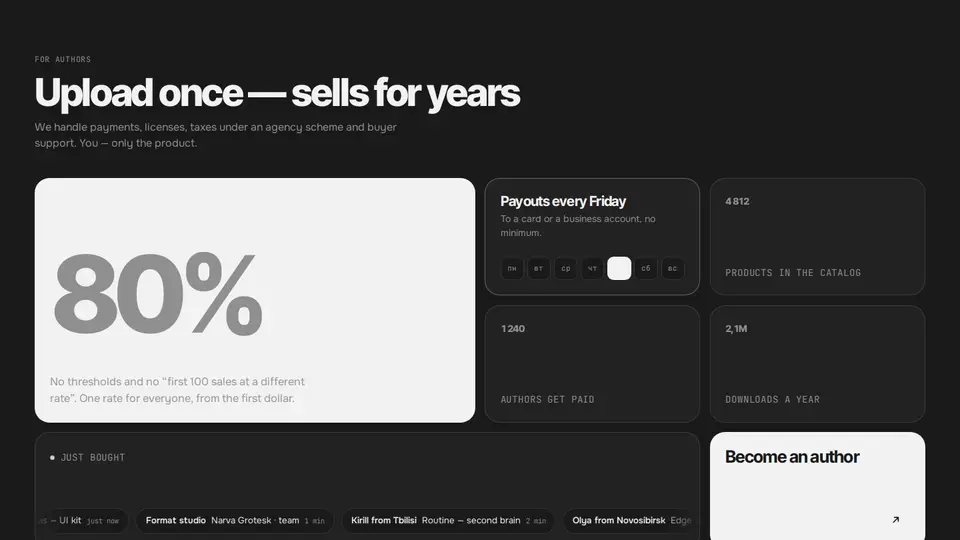
A “why sell here” bento: an accent 2×2 tile with a huge author-share number, a payout tile with a week strip and a pulsing Friday, three counter tiles (products, authors, downloads), a wide “just bought” tile with a purchases ticker and a black “become an author” button tile. All numbers count up from zero when the section enters the viewport.
React + Tailwind, shadcn-compatible: press “Copy for AI” and your Cursor or Claude Code agent installs it with the shadcn CLI.
What you can change
- eyebrow, title, lede, heroText, payoutTitle, payoutText, payoutDay, purchasesLabel, ctaLabel, ctaHref
- hero and stats: value, label, prefix, suffix, decimals
- purchases: who, what, ago
A link for your AI agent: preview, code and instructions.
Preview
Use it with AI
- 1. Copy the link.
- 2. Write to your agent in your own words and drop the link into the sentence.
- 3. The agent opens the link and installs the component from the registry.
put this on the home page as the hero:
https://vibeui.club/c/bento-010?lang=en&theme=dark
Not sure where to paste it? Step-by-step guide
Show the full instructions
What the link says, spelled out. Use it when your agent cannot open links — paste this text instead.
Loading…
How to use
<Bento010
  hero={{ value: 80, suffix: "%", label: "of every sale goes to the author" }}
  stats={[{ value: 4812, label: "products" }, { value: 2.1, decimals: 1, suffix: "M", label: "downloads" }]}
  purchases={[{ who: "Masha from Kazan", what: "Atlas — UI kit", ago: "just now" }]}
/>
A sample call. The agent installs the component itself from the registry via the “Copy for AI” link.
Settings
- Title
title· default: Upload once — sells for years- Button
ctaLabel· default: Become an author- Theme
tone· default: auto- Accent
accent· default: theme colour- Ink
ink· default: theme colour- Background
background· default: theme colour
Used in scenarios
- Template marketplaceFor authors
More in Layouts
FAQ
- How do I add Authors bento: counting numbers, a payout calendar, a purchases ticker with Cursor or Claude Code?
- Press “Copy for AI” on this page and paste it into your agent's chat. The instruction contains the shadcn CLI install command, the dependencies and what to keep, so the agent installs this exact component instead of recreating a lookalike.
- What does Authors bento: counting numbers, a payout calendar, a purchases ticker depend on?
- No npm packages beyond React and Tailwind CSS.
- What can I change in Authors bento: counting numbers, a payout calendar, a purchases ticker?
- Adapt: eyebrow, title, lede, heroText, payoutTitle, payoutText, payoutDay, purchasesLabel, ctaLabel, ctaHref; hero and stats: value, label, prefix, suffix, decimals; purchases: who, what, ago. Keep as installed: the imports from @/components/vibeui/ — do not inline their code into the block or swap in your own; the parts receive props only; counters share one progress state 0→1: IntersectionObserver (threshold .25) starts a 1.6s rAF with cubic ease-out, 1 at once under reduce-motion; the ticker is two identical ul with translateX(-100%) over 32s, the second aria-hidden; mask-image at the edges, paused on hover.
- Is Authors bento: counting numbers, a payout calendar, a purchases ticker free?
- The preview is open to everyone; the source is available with a PRO subscription.
For developers
npx shadcn@latest add https://vibeui.club/r/pro/bento-010.jsonThis command needs a signed link: sign in and open “Component source” below — it issues a working link valid for 30 minutes. All install options
Technical notes
A composite block: imports from @/components/vibeui/ — the install command brings them along with the block. The block owns the layout and its own text, passes the parts props only and leaves their --vibeui-<name>-* palettes alone.
Tags
- bento
- stats
- counters
- marketplace
- authors
- payout
- marquee
- ticker
- grid
- numbers
- composite
Component source
The same file your agent installs. Here in case you would rather copy it by hand.
Loading…