Pricing
Inverted Pricing
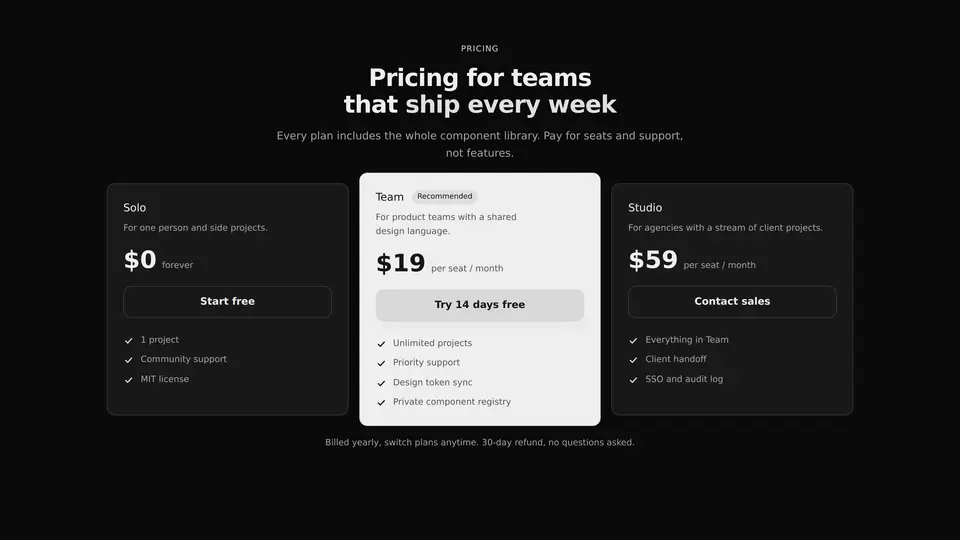
A pricing section of three plans: the recommended one stands out as an inverted panel while the others stay light. It follows the surrounding theme and drags none of your project's styling along.
React + Tailwind, shadcn-compatible: press “Copy for AI” and your Cursor or Claude Code agent installs it with the shadcn CLI.
What you can change
- the eyebrow, title, titleAccent, description and footnote copy
- up to three plans: name, description, price, period
- up to four points inside each plan
Built from
The install command brings these components too. The block only passes them props: their palette and behaviour stay their own.
A link for your AI agent: preview, code and instructions.
Preview
Use it with AI
- 1. Copy the link.
- 2. Write to your agent in your own words and drop the link into the sentence.
- 3. The agent opens the link and installs the component from the registry.
put this on the home page as the hero:
https://vibeui.club/c/pricing-001?lang=en&theme=dark
Not sure where to paste it? Step-by-step guide
Show the full instructions
What the link says, spelled out. Use it when your agent cannot open links — paste this text instead.
Loading…
Settings
- Accent
accent· default: theme colour- Text on accent
accentForeground· default: theme colour- Background
background· default: theme colour- Badge
badgeLabel· default: Recommended
More in Pricing
FAQ
- How do I add Inverted Pricing with Cursor or Claude Code?
- Press “Copy for AI” on this page and paste it into your agent's chat. The instruction contains the shadcn CLI install command, the dependencies and what to keep, so the agent installs this exact component instead of recreating a lookalike.
- What does Inverted Pricing depend on?
- No npm packages beyond React and Tailwind CSS. It also installs catalog components: button-016.
- What can I change in Inverted Pricing?
- Adapt: the eyebrow, title, titleAccent, description and footnote copy; up to three plans: name, description, price, period; up to four points inside each plan. Keep as installed: the button-016 imports from @/components/vibeui/ — do not inline their code into the block or swap in your own; the parts receive props only; the hierarchy: exactly one recommended plan marked by an inverted dark panel, the others staying light and shadowless — do not level all three into identical cards; inversion as the device: the dark panel is the only heavy surface in the section and it is what creates the accent; do not replace it with a border, a shadow or another shade of light.
- Is Inverted Pricing free?
- Yes. The preview is open without an account; with a free account you can copy up to 20 components a month.
For developers
npx shadcn@latest add https://vibeui.club/r/pro/pricing-001.jsonThis command needs a signed link: sign in and open “Component source” below — it issues a working link valid for 30 minutes. All install options
Technical notes
A composite block: imports button-016 from @/components/vibeui/ — the install command brings them along with the block. The block owns the layout and its own text, passes the parts props only and leaves their --vibeui-<name>-* palettes alone. The block is self-contained: one file, no npm dependencies. The colours live in the local variables --vibeui-pricing-001-* and are declared through light-dark(), so the section follows the surrounding color-scheme; the accent is changed with the accent prop and the background with the background prop, and by default there is none. The layout is switched by container queries against the block's own width. This is a landing section, not a checkout: the prices are static content, the CTAs are ordinary links, and the block holds no billing logic.
Tags
- light
- pricing
- saas
- plans
- landing
- section
- composite
Component source
The same file your agent installs. Here in case you would rather copy it by hand.
Loading…