Pricing
Price calculator by size and zone with packages
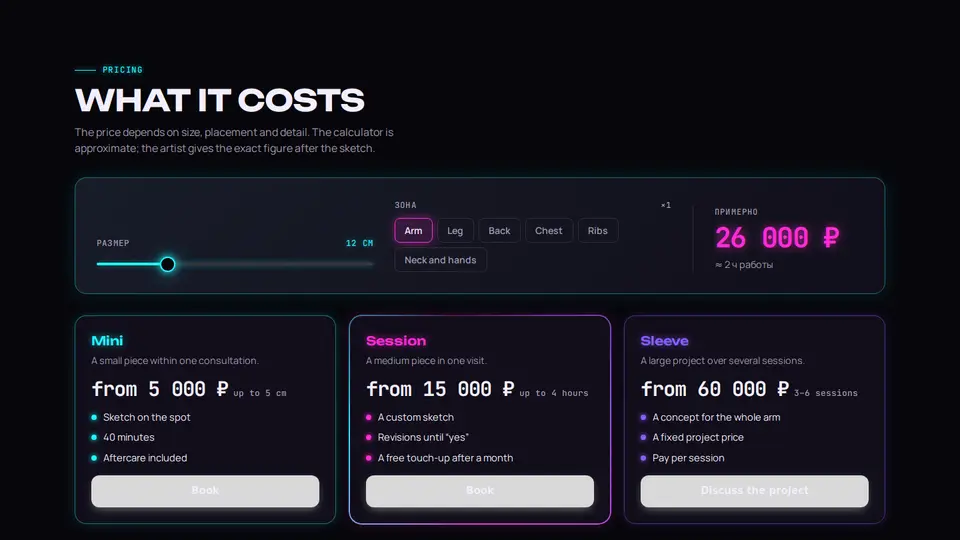
Tattoo pricing: a calculator — a neon size slider in centimetres and body-zone pills with a multiplier, the total flips on every change, next to it “about N hours”. Below three packages with neon frames in their own colours, the featured one with a spinning conic frame.
React + Tailwind, shadcn-compatible: press “Copy for AI” and your Cursor or Claude Code agent installs it with the shadcn CLI.
What you can change
- ratePerCm, minPrice, minSize, maxSize, defaultSize, zones (labels and multipliers)
- packages: names, texts, prices, hints, features, featured, colours, links; note, currency; eyebrow, title, lede
- accent and background, tone
Built from
The install command brings these components too. The block only passes them props: their palette and behaviour stay their own.
A link for your AI agent: preview, code and instructions.
Preview
Use it with AI
- 1. Copy the link.
- 2. Write to your agent in your own words and drop the link into the sentence.
- 3. The agent opens the link and installs the component from the registry.
put this on the home page as the hero:
https://vibeui.club/c/pricing-022?lang=en&theme=dark
Not sure where to paste it? Step-by-step guide
Show the full instructions
What the link says, spelled out. Use it when your agent cannot open links — paste this text instead.
Loading…
How to use
<Pricing022
  ratePerCm={180}
  minPrice={5000}
  zones={[{ key: "arm", label: "Arm", factor: 1 }, { key: "ribs", label: "Ribs", factor: 1.4 }]}
  packages={[
    { name: "Session", price: "from 15,000", hint: "up to 4 hours", features: ["A custom sketch", "A touch-up after a month"], featured: true, color: "#ff2bd6", actionLabel: "Book", actionHref: "#booking" },
  ]}
/>
A sample call. The agent installs the component itself from the registry via the “Copy for AI” link.
Settings
- Theme
tone· default: auto- Title
title· default: What it costs- ₽ per cm²
ratePerCm· default: 180- Accent
accent· default: theme colour- Background
background· default: theme colour
Used in scenarios
- Tattoo studioPricing
More in Pricing
- Podcast support tiers with a monthly/yearly switch
- App pricing: free and premium with a table
- Pricing with a seats slider and a yearly switch
- Price tickets with pet-type tabs and external switching
- School pricing: a format switch, a lessons-per-week slider and “us vs app vs tutor”
- Pricing in one card: a plan switch and an employee slider
FAQ
- How do I add Price calculator by size and zone with packages with Cursor or Claude Code?
- Press “Copy for AI” on this page and paste it into your agent's chat. The instruction contains the shadcn CLI install command, the dependencies and what to keep, so the agent installs this exact component instead of recreating a lookalike.
- What does Price calculator by size and zone with packages depend on?
- No npm packages beyond React and Tailwind CSS. It also installs catalog components: button-016, slider-013.
- What can I change in Price calculator by size and zone with packages?
- Adapt: ratePerCm, minPrice, minSize, maxSize, defaultSize, zones (labels and multipliers); packages: names, texts, prices, hints, features, featured, colours, links; note, currency; eyebrow, title, lede; accent and background, tone. Keep as installed: the button-016, slider-013 imports from @/components/vibeui/ — do not inline their code into the block or swap in your own; the parts receive props only; the size-and-zone calculator with a flipping total — people see the price range before calling; package neon frames in colours from the data and the featured spinning conic frame.
- Is Price calculator by size and zone with packages free?
- The preview is open to everyone; the source is available with a PRO subscription.
For developers
npx shadcn@latest add https://vibeui.club/r/pro/pricing-022.jsonThis command needs a signed link: sign in and open “Component source” below — it issues a working link valid for 30 minutes. All install options
Technical notes
A composite block: imports button-016, slider-013 from @/components/vibeui/ — the install command brings them along with the block. The block owns the layout and its own text, passes the parts props only and leaves their --vibeui-<name>-* palettes alone. One file, zero npm dependencies, “use client” for size and zone. The slider is an input type=range with a styled track: a fill up to --fill from the value, a thumb with a neon box-shadow. Zones are buttons with aria-pressed and a factor. The formula: max(minPrice, round(size² × ratePerCm × factor / 500) × 500), hours ≈ size²/60; the total is a span keyed by value with a slide-in @keyframes, aria-live. Packages are <li> with pack.color in --neon (frame, name, dots); featured gets a ::before with conic-gradient(from var(--a)) via @property and a ring mask. From 60rem (container query) the calculator is three columns, packages three. Palette --vibeui-pricing-022-*: a near-black background, light text, neon magenta #ff2bd6 as the accent, violet #8b5cff and cyan #22f3ff for captions, lime #c8ff3a for statuses; glows via text-shadow and box-shadow. The block is always dark inside (color-scheme:dark), the page background comes via background. Unbounded, Manrope and JetBrains Mono via <link precedence> from Google Fonts with system fallbacks. accent and background override colours, prefers-reduced-motion disables animations.
Tags
- tattoo
- neon
- dark
- studio
- landing
- pricing
- calculator
- slider
- packages
- conic
- composite
Component source
The same file your agent installs. Here in case you would rather copy it by hand.
Loading…