Hero
Plain Centred Hero
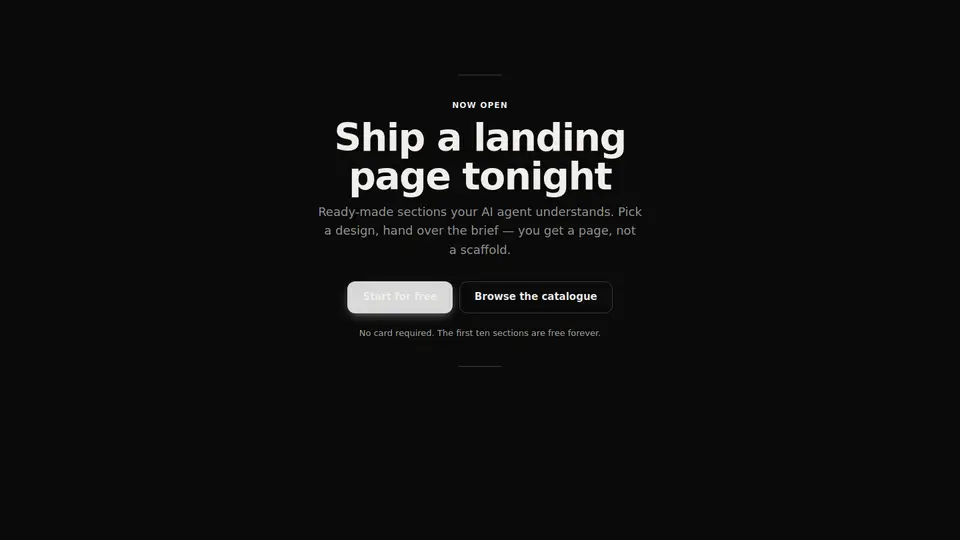
A calm typographic hero: short rules above and below, a large headline, a subhead and a pair of centred buttons. No mockup, no photo — words and air.
React + Tailwind, shadcn-compatible: press “Copy for AI” and your Cursor or Claude Code agent installs it with the shadcn CLI.
What you can change
- the eyebrow, title, lede and note copy
- the labels and hrefs of the primary and secondary buttons
- the accent colour through the accent prop
Built from
The install command brings these components too. The block only passes them props: their palette and behaviour stay their own.
A link for your AI agent: preview, code and instructions.
Preview
Use it with AI
- 1. Copy the link.
- 2. Write to your agent in your own words and drop the link into the sentence.
- 3. The agent opens the link and installs the component from the registry.
put this on the home page as the hero:
https://vibeui.club/c/hero-004?lang=en&theme=dark
Not sure where to paste it? Step-by-step guide
Show the full instructions
What the link says, spelled out. Use it when your agent cannot open links — paste this text instead.
Loading…
How to use
<Hero004 title="Ship a landing page tonight" primary={{ label: "Get started", href: "/signup" }} />A sample call. The agent installs the component itself from the registry via the “Copy for AI” link.
Settings
- Theme
tone· default: auto- Headline
title· default: Ship a landing page tonight- Eyebrow
eyebrow· default: Now open- Accent
accent· default: theme colour- Backdrop
background· default: theme colour
More in Hero
FAQ
- How do I add Plain Centred Hero with Cursor or Claude Code?
- Press “Copy for AI” on this page and paste it into your agent's chat. The instruction contains the shadcn CLI install command, the dependencies and what to keep, so the agent installs this exact component instead of recreating a lookalike.
- What does Plain Centred Hero depend on?
- No npm packages beyond React and Tailwind CSS. It also installs catalog components: button-016, heading-001.
- What can I change in Plain Centred Hero?
- Adapt: the eyebrow, title, lede and note copy; the labels and hrefs of the primary and secondary buttons; the accent colour through the accent prop. Keep as installed: the button-016, heading-001 imports from @/components/vibeui/ — do not inline their code into the block or swap in your own; the parts receive props only; the absence of an illustration: the whole point of the block is that the first screen is carried by words, not by a mockup or a photo; the two short rules above and below — they set the vertical bounds of the composition; without them the block loses its shape.
- Is Plain Centred Hero free?
- Yes. The preview is open without an account; with a free account you can copy up to 20 components a month.
For developers
npx shadcn@latest add https://vibeui.club/r/pro/hero-004.jsonThis command needs a signed link: sign in and open “Component source” below — it issues a working link valid for 30 minutes. All install options
Technical notes
A composite block: imports button-016, heading-001 from @/components/vibeui/ — the install command brings them along with the block. The block owns the layout and its own text, passes the parts props only and leaves their --vibeui-<name>-* palettes alone. A server component, one file, zero npm dependencies. The palette is in the --vibeui-hero-004-* variables, and the theme comes from the surrounding color-scheme through light-dark(); there is no backdrop by default — the block sits on the page background, and the backdrop is set with the background prop. The layout is computed by container queries against the block width: below 34rem the buttons run in a full-width column, beyond it they become a centred row. The inner [data-part="shell"] layer holds the max-width and the padding — @container rules do not apply to the container itself. There are no animations, only a transition on the buttons, and prefers-reduced-motion is declared for it.
Tags
- hero
- minimal
- centered
- typographic
- composite
Component source
The same file your agent installs. Here in case you would rather copy it by hand.
Loading…