Hero
Invitation hero with an envelope, countdown and “add to calendar”
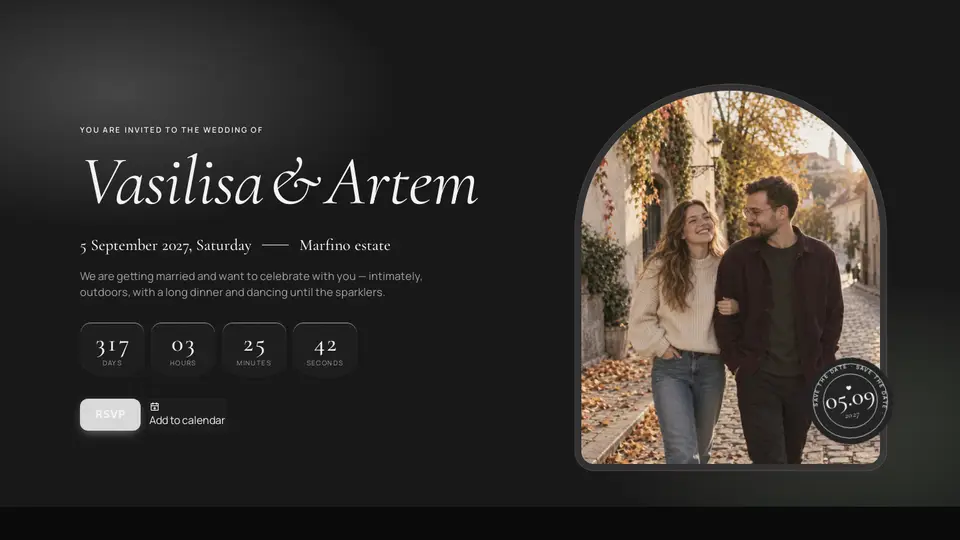
A wedding site hero: an envelope with a wax seal lies over the whole screen on a deep plum backdrop with a glow — a click opens the flap with its plum lining, the letter slides out, the envelope dissolves. Beneath it a cream sheet with soft accent and sage glows, the names in italic serif with an accent ampersand, date and place, a countdown in glass tiles, “RSVP” and “Add to calendar” buttons (the .ics is built on the client) and the couple's photo in an arch with a “save the date” stamp. Film grain on top.
React + Tailwind, shadcn-compatible: press “Copy for AI” and your Cursor or Claude Code agent installs it with the shadcn CLI.
What you can change
- names (with “ & ”), eyebrow, date (ISO), dateLabel, place, lede, stamp, countdownLabels
- primaryLabel/Href, calendarLabel/Title/Location, image, imageAlt, envelope, sealHint, envelopeLabel
- accent and background, tone
Built from
The install command brings these components too. The block only passes them props: their palette and behaviour stay their own.
A link for your AI agent: preview, code and instructions.
Preview
Use it with AI
- 1. Copy the link.
- 2. Write to your agent in your own words and drop the link into the sentence.
- 3. The agent opens the link and installs the component from the registry.
put this on the home page as the hero:
https://vibeui.club/c/hero-025?lang=en&theme=dark
Not sure where to paste it? Step-by-step guide
Show the full instructions
What the link says, spelled out. Use it when your agent cannot open links — paste this text instead.
Loading…
How to use
<Hero025
  names="Vasilisa & Artem"
  date="2027-09-05T15:00:00+03:00"
  dateLabel="5 September 2027, Saturday"
  place="Marfino estate"
  lede="We are getting married and want to celebrate with you."
  primaryLabel="RSVP"
  primaryHref="#rsvp"
  calendarTitle="Vasilisa & Artem wedding"
  calendarLocation="Marfino estate, Moscow region"
  image="/photos/hero.webp"
  envelope
/>
A sample call. The agent installs the component itself from the registry via the “Copy for AI” link.
Settings
- Names
names· default: Vasilisa & Artem- Date label
dateLabel· default: 5 September 2027, Saturday- Place
place· default: Marfino estate- Envelope
envelope· default: on- Theme
tone· default: auto- Accent
accent· default: theme colour- Background
background· default: theme colour
Used in scenarios
- Wedding invitationEnvelope and hero
More in Hero
FAQ
- How do I add Invitation hero with an envelope, countdown and “add to calendar” with Cursor or Claude Code?
- Press “Copy for AI” on this page and paste it into your agent's chat. The instruction contains the shadcn CLI install command, the dependencies and what to keep, so the agent installs this exact component instead of recreating a lookalike.
- What does Invitation hero with an envelope, countdown and “add to calendar” depend on?
- No npm packages beyond React and Tailwind CSS. It also installs catalog components: button-016.
- What can I change in Invitation hero with an envelope, countdown and “add to calendar”?
- Adapt: names (with “ & ”), eyebrow, date (ISO), dateLabel, place, lede, stamp, countdownLabels; primaryLabel/Href, calendarLabel/Title/Location, image, imageAlt, envelope, sealHint, envelopeLabel; accent and background, tone. Keep as installed: the button-016 imports from @/components/vibeui/ — do not inline their code into the block or swap in your own; the parts receive props only; the full-screen envelope on deep plum with the pulsing seal, opening on click and dissolving — the page's main gesture; the glass countdown tiles with rounded bottoms and the italic names with the accent ampersand over soft glows.
- Is Invitation hero with an envelope, countdown and “add to calendar” free?
- The preview is open to everyone; the source is available with a PRO subscription.
For developers
npx shadcn@latest add https://vibeui.club/r/pro/hero-025.jsonThis command needs a signed link: sign in and open “Component source” below — it issues a working link valid for 30 minutes. All install options
Technical notes
A composite block: imports button-016 from @/components/vibeui/ — the install command brings them along with the block. The block owns the layout and its own text, passes the parts props only and leaves their --vibeui-<name>-* palettes alone. One file, zero npm dependencies, “use client” for the envelope, countdown and .ics. Layout from the block width: a column below 56rem, two columns from 56rem (text 1.15fr / photo .85fr, min-height 40rem). The envelope is [data-part=envelope] position:fixed over the whole screen above the header (z-index 60), a deep plum radial-gradient with grain and a pulsing accent ::after glow: paper with perspective, a clip-path polygon flap with rotateX(180deg), a pocket over the letter, the letter translateY(-55%), a radial-gradient seal with the initials and a pulsing box-shadow, an envelopeLabel caption and the names on the envelope; after opening the flap shows a striped lining; data-open runs an unhurried five-second transition chain: the seal (0.5 s), the flap (1.3 s from 0.35 s), the letter rising out of the pocket with its bottom behind the front folds (1.6 s from 1.3 s); z-index layers: back 0, open flap 0, letter 1, front folds 2, closed flap 3, seal 4, the envelope gliding down 7rem right after the click (1.3 s) to make room for the letter, fading from 3 s, the backdrop fading over 1.8 s from 3.1 s; the hero beneath fades in with a 3.2 s delay (data-intro), so the switch is a cross-fade, not a jump. envelope=false skips the intro; inside a nested frame (window.self !== window.top: scenario showcase, preview) the envelope is not rendered because it cannot be clicked there — read via useSyncExternalStore without hydration mismatch; reduced-motion hides the envelope and shows the letter at once. The countdown tiles and “Add to calendar” are glass: translucent cream with backdrop-filter and a light top edge; two ::before glows sit behind the sheet (accent top-left, sage bottom-right). The countdown is a 1-second setInterval, the first frame shows zeros (matches the server), days/hours/minutes/seconds from date (ISO). “Add to calendar” builds a text/calendar Blob with a 9-hour VEVENT and downloads it via a temporary link. The photo arch is border-radius 50%/38% on an inner layer, the sticker stamp floats via keyframes. Grain is an SVG feTurbulence in ::after with multiply. Palette --vibeui-hero-025-* is neutral: ink and paper via light-dark(), the site colours come through the accent, ink and background props; dark theme via .dark/[data-theme] or tone. Cormorant Garamond and Manrope come via <link precedence> from Google Fonts with Georgia and system fallbacks. accent and background override colours, prefers-reduced-motion disables animations.
Tags
- wedding
- invitation
- hero
- envelope
- wax seal
- countdown
- save the date
- calendar
- ics
- arch
- serif
- cream
- film grain
- composite
Component source
The same file your agent installs. Here in case you would rather copy it by hand.
Loading…