Hero
Neon sign hero with a photo and a cursor glow
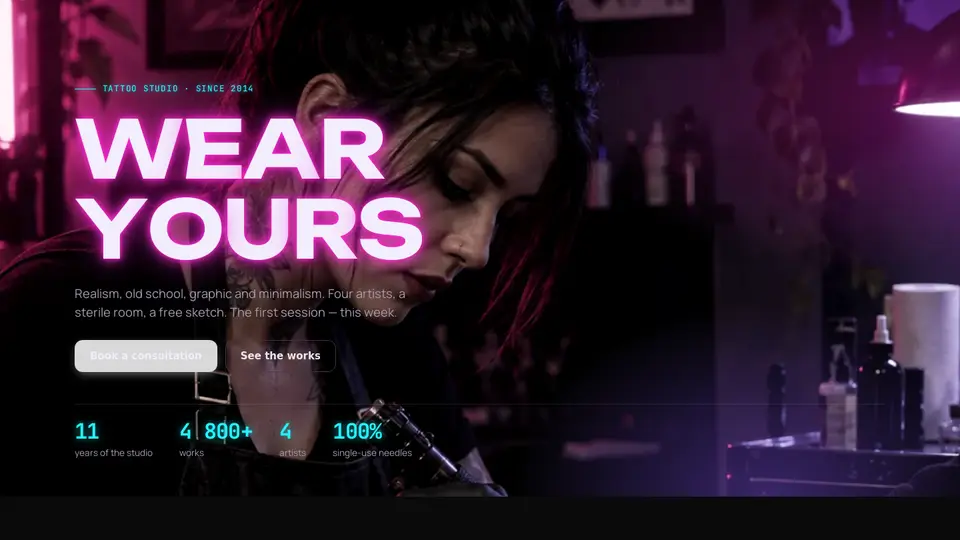
A tattoo studio first screen: the headline as a neon sign — letters light up one by one with a spark, one tube “buzzes” and flickers. Behind, a large photo of an artist at work with film grain and a magenta rim light; a soft glow follows the cursor. Counters of years and works count up at the bottom.
React + Tailwind, shadcn-compatible: press “Copy for AI” and your Cursor or Claude Code agent installs it with the shadcn CLI.
What you can change
- eyebrow, title (\n breaks), flicker (letter index or -1), lede
- primaryLabel/Href, secondaryLabel/Href, image, imageAlt, facts
- trail, accent and background, tone
Built from
The install command brings these components too. The block only passes them props: their palette and behaviour stay their own.
A link for your AI agent: preview, code and instructions.
Preview
Use it with AI
- 1. Copy the link.
- 2. Write to your agent in your own words and drop the link into the sentence.
- 3. The agent opens the link and installs the component from the registry.
put this on the home page as the hero:
https://vibeui.club/c/hero-024?lang=en&theme=dark
Not sure where to paste it? Step-by-step guide
Show the full instructions
What the link says, spelled out. Use it when your agent cannot open links — paste this text instead.
Loading…
How to use
<Hero024
  eyebrow="Tattoo studio · since 2014"
  title="Wear\nyours"
  flicker={5}
  lede="Realism, old school, graphic and minimalism."
  primaryLabel="Book"
  primaryHref="#booking"
  image="/photos/hero.webp"
  facts={[{ value: "11", label: "years" }, { value: "4,800+", label: "works" }]}
/>
A sample call. The agent installs the component itself from the registry via the “Copy for AI” link.
Settings
- Theme
tone· default: auto- Title
title· default: Wear yours- Flickering letter
flicker· default: 5- Cursor glow
trail· default: on- Accent
accent· default: theme colour- Background
background· default: theme colour
Used in scenarios
- Tattoo studioFirst screen
More in Hero
FAQ
- How do I add Neon sign hero with a photo and a cursor glow with Cursor or Claude Code?
- Press “Copy for AI” on this page and paste it into your agent's chat. The instruction contains the shadcn CLI install command, the dependencies and what to keep, so the agent installs this exact component instead of recreating a lookalike.
- What does Neon sign hero with a photo and a cursor glow depend on?
- No npm packages beyond React and Tailwind CSS. It also installs catalog components: button-016.
- What can I change in Neon sign hero with a photo and a cursor glow?
- Adapt: eyebrow, title (\n breaks), flicker (letter index or -1), lede; primaryLabel/Href, secondaryLabel/Href, image, imageAlt, facts; trail, accent and background, tone. Keep as installed: the button-016 imports from @/components/vibeui/ — do not inline their code into the block or swap in your own; the parts receive props only; the sign lighting up letter by letter and one buzzing letter — the screen’s main gesture; film grain and magenta rim light over the photo.
- Is Neon sign hero with a photo and a cursor glow free?
- The preview is open to everyone; the source is available with a PRO subscription.
For developers
npx shadcn@latest add https://vibeui.club/r/pro/hero-024.jsonThis command needs a signed link: sign in and open “Component source” below — it issues a working link valid for 30 minutes. All install options
Technical notes
A composite block: imports button-016 from @/components/vibeui/ — the install command brings them along with the block. The block owns the layout and its own text, passes the parts props only and leaves their --vibeui-<name>-* palettes alone. One file, zero npm dependencies, “use client” for the cursor glow and counters. The headline is split into letters: each a span with -webkit-text-stroke and a light @keyframes (steps(2)) delayed --i×70ms; the letter at index flicker gets a second buzz animation with opacity dips; an aria-label on the h1 carries the whole text. The photo is position:absolute with a slow scale and darkening gradients; the grain is an SVG feTurbulence data URI with a steps(4) @keyframes. The glow is a radial-gradient at --mx/--my from pointermove (mouse only), written into style without re-renders. Counters use an IntersectionObserver and a 1.4 s requestAnimationFrame; the number is parsed out of value, text without digits shows as is. Palette --vibeui-hero-024-*: a near-black background, light text, neon magenta #ff2bd6 as the accent, violet #8b5cff and cyan #22f3ff for captions, lime #c8ff3a for statuses; glows via text-shadow and box-shadow. The block is always dark inside (color-scheme:dark), the page background comes via background. Unbounded, Manrope and JetBrains Mono via <link precedence> from Google Fonts with system fallbacks. accent and background override colours, prefers-reduced-motion disables animations.
Tags
- tattoo
- neon
- dark
- studio
- landing
- hero
- sign
- letters
- grain
- counter
- composite
Component source
The same file your agent installs. Here in case you would rather copy it by hand.
Loading…