Interface
Bubbles
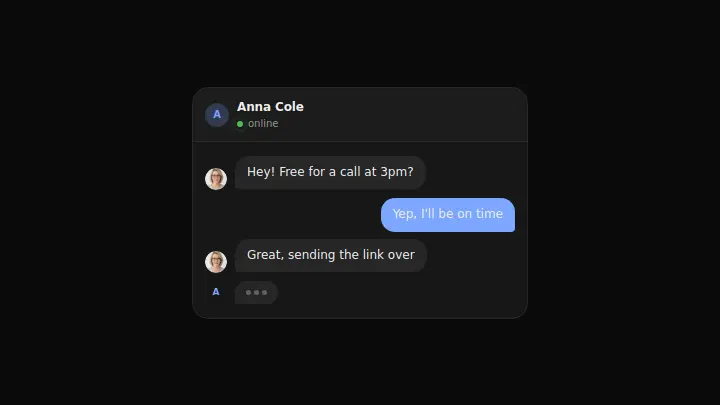
A conversation of chat bubbles between two people: bubbles rise in one by one from the bottom, the other person has an initial avatar, and a three-dot "typing…" indicator can hold after the last message.
React + Tailwind, shadcn-compatible: press “Copy for AI” and your Cursor or Claude Code agent installs it with the shadcn CLI.
What you can change
- the messages list: text and author (me/them) for each bubble
- the contact name title and the status text in the header
- typing: false removes the "typing…" indicator after the last message
A link for your AI agent: preview, code and instructions.
Preview
Use it with AI
- 1. Copy the link.
- 2. Write to your agent in your own words and drop the link into the sentence.
- 3. The agent opens the link and installs the component from the registry.
put this on the home page as the hero:
https://vibeui.club/c/chat-002?lang=en&theme=dark
Not sure where to paste it? Step-by-step guide
Show the full instructions
What the link says, spelled out. Use it when your agent cannot open links — paste this text instead.
Loading…
How to use
<Chat002 title="Anna Cole" messages={[{ text: "Hi!", author: "them" }]} typing />A sample call. The agent installs the component itself from the registry via the “Copy for AI” link.
Settings
- Typing indicator
typing· default: on- Accent
accent· default: theme colour
More in Interface
FAQ
- How do I add Bubbles with Cursor or Claude Code?
- Press “Copy for AI” on this page and paste it into your agent's chat. The instruction contains the shadcn CLI install command, the dependencies and what to keep, so the agent installs this exact component instead of recreating a lookalike.
- What does Bubbles depend on?
- No npm packages beyond React and Tailwind CSS.
- What can I change in Bubbles?
- Adapt: the messages list: text and author (me/them) for each bubble; the contact name title and the status text in the header; typing: false removes the "typing…" indicator after the last message. Keep as installed: the local --vibeui-chat-002-* palette — do not swap it for your theme tokens; the bottom-up stagger reveal of messages on card load; the initial avatar for the other person on the left and its absence on your bubbles on the right.
- Is Bubbles free?
- The preview is open to everyone; the source is available with a PRO subscription.
For developers
npx shadcn@latest add https://vibeui.club/r/pro/chat-002.jsonThis command needs a signed link: sign in and open “Component source” below — it issues a working link valid for 30 minutes. All install options
Technical notes
The component is self-contained: one file, zero dependencies, palette in local --vibeui-chat-002-* variables. It takes the theme from the environment via light-dark() plus a rule for the .dark class. Messages rise in one by one on load (stagger rise+fade by nth-child), the "typing…" indicator is three dots pulsing out of sync in a loop; everything stops under prefers-reduced-motion.
Tags
- chat
- bubbles
- conversation
- typing
- messenger
- animated
Component source
The same file your agent installs. Here in case you would rather copy it by hand.
Loading…