Industry sections
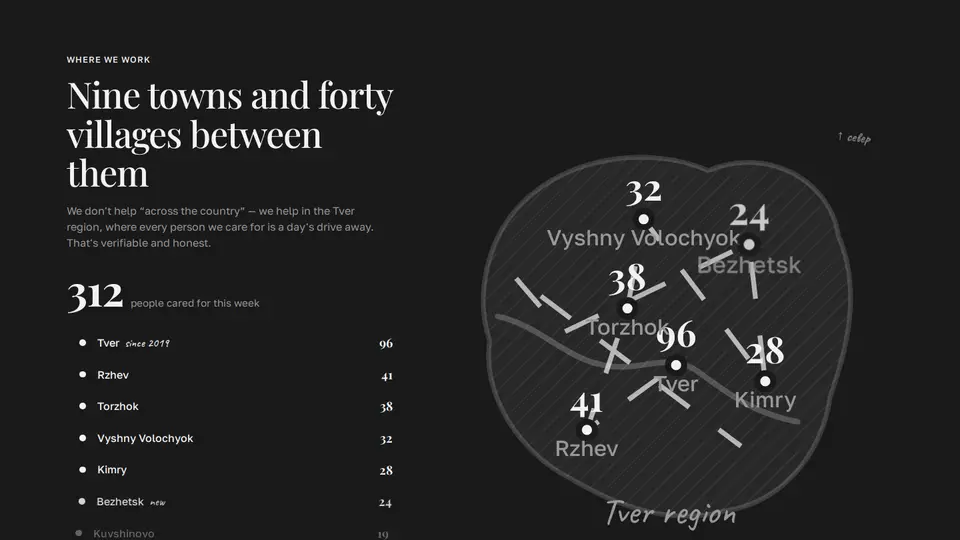
Help map: dots light up in turn with beneficiary counts
A stylised region map for a foundation: a soft SVG outline with hatching and a river, a dashed route between towns that draws itself, and pulsing-halo dots that light up in turn with the beneficiary count above each when the block enters the viewport. On the left the total and a list of towns: rows highlight in sync with the dots, hovering a row speeds up that dot's pulse.
React + Tailwind, shadcn-compatible: press “Copy for AI” and your Cursor or Claude Code agent installs it with the shadcn CLI.
What you can change
- eyebrow, title, lede, region, unit
- points: city, count, x, y (0–100), note
- the region shape — the LAND and RIVER constants
Built from
The install command brings these components too. The block only passes them props: their palette and behaviour stay their own.
A link for your AI agent: preview, code and instructions.
Preview
Use it with AI
- 1. Copy the link.
- 2. Write to your agent in your own words and drop the link into the sentence.
- 3. The agent opens the link and installs the component from the registry.
put this on the home page as the hero:
https://vibeui.club/c/charity-004?lang=en&theme=dark
Not sure where to paste it? Step-by-step guide
Show the full instructions
What the link says, spelled out. Use it when your agent cannot open links — paste this text instead.
Loading…
How to use
<Charity004
  title="Nine towns and forty villages between them"
  region="Tver region"
  points={[{ city: "Tver", count: 96, x: 52, y: 58 }, { city: "Rzhev", count: 41, x: 30, y: 74 }]}
/>
A sample call. The agent installs the component itself from the registry via the “Copy for AI” link.
Settings
- Title
title· default: Nine towns and forty villages between them- Region
region· default: Tver region- Theme
tone· default: auto- Accent
accent· default: theme colour- Ink
ink· default: theme colour- Background
background· default: theme colour
Used in scenarios
- Charity foundationHelp map
More in Industry sections
- “Become a volunteer”: role and day chips, a live badge and a “helped today” counter
- Delivery menu: dish cards with a cursor spotlight, fly-to-cart and a “to free delivery” bar
- Bowl builder: ingredient photos drop into the bowl, calories and price on the fly
- Delivery zones on a Yandex map: zone rings around the kitchen, address pins, click → time and price
- Order tracker: steps with live progress and a phone with a map where the courier drives
- Sticker reviews with emoji reactions and a live orders counter
FAQ
- How do I add Help map: dots light up in turn with beneficiary counts with Cursor or Claude Code?
- Press “Copy for AI” on this page and paste it into your agent's chat. The instruction contains the shadcn CLI install command, the dependencies and what to keep, so the agent installs this exact component instead of recreating a lookalike.
- What does Help map: dots light up in turn with beneficiary counts depend on?
- No npm packages beyond React and Tailwind CSS. It also installs catalog components: card-082.
- What can I change in Help map: dots light up in turn with beneficiary counts?
- Adapt: eyebrow, title, lede, region, unit; points: city, count, x, y (0–100), note; the region shape — the LAND and RIVER constants. Keep as installed: the card-082 imports from @/components/vibeui/ — do not inline their code into the block or swap in your own; the parts receive props only; lighting is a 380 ms setInterval after IntersectionObserver (threshold .35), the lit state is the count lit; all at once under reduce-motion; a dot is a g with transform-box:fill-box scaling from 0 with a bounce, the halo has pulse keyframes; data-hot speeds up the pulse.
- Is Help map: dots light up in turn with beneficiary counts free?
- The preview is open to everyone; the source is available with a PRO subscription.
For developers
npx shadcn@latest add https://vibeui.club/r/pro/charity-004.jsonThis command needs a signed link: sign in and open “Component source” below — it issues a working link valid for 30 minutes. All install options
Technical notes
A composite block: imports card-082 from @/components/vibeui/ — the install command brings them along with the block. The block owns the layout and its own text, passes the parts props only and leaves their --vibeui-<name>-* palettes alone.
Tags
- charity
- map
- region
- svg
- coverage
- cities
- nonprofit
- animation
- counter
- geography
- composite
Component source
The same file your agent installs. Here in case you would rather copy it by hand.
Loading…