Industry sections
Listings grid with filter
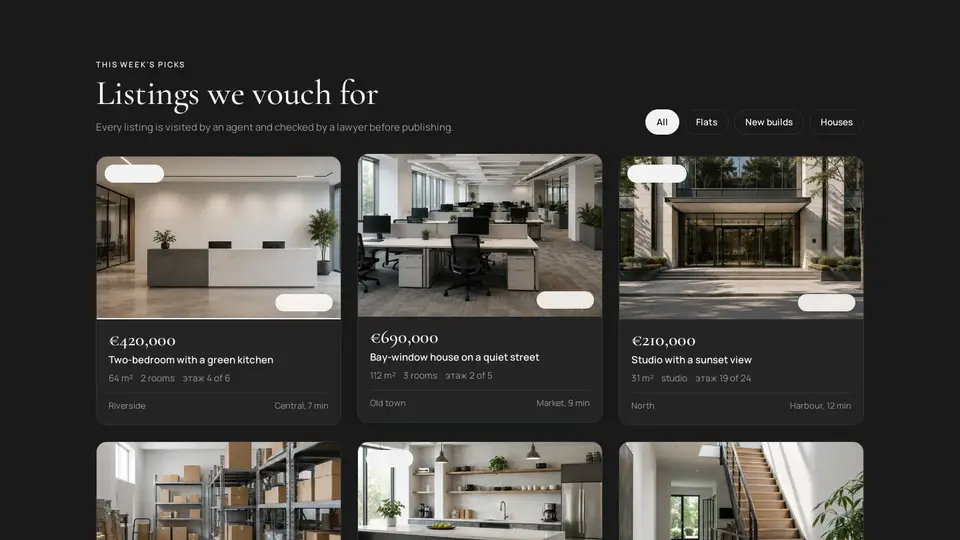
A grid of property listings: a large serif price, area, rooms, floor, district and metro; a “new build” or “urgent” badge. Type chips filter without reload, the photo swaps to a second one on hover, and a click flies the card to the centre of the screen, grows and flips it into a window: the second photo full-frame, a description, highlights and a link to the listing.
React + Tailwind, shadcn-compatible: press “Copy for AI” and your Cursor or Claude Code agent installs it with the shadcn CLI.
What you can change
- listings: properties, two photos (image and imageHover — the second goes into the window), badges, text and features, links
- eyebrow, title, lede, allLabel, moreLabel, moreHref, flipHint, openLabel, closeLabel
- accent and background, tone
Built from
The install command brings these components too. The block only passes them props: their palette and behaviour stay their own.
A link for your AI agent: preview, code and instructions.
Preview
Use it with AI
- 1. Copy the link.
- 2. Write to your agent in your own words and drop the link into the sentence.
- 3. The agent opens the link and installs the component from the registry.
put this on the home page as the hero:
https://vibeui.club/c/realty-003?lang=en&theme=dark
Not sure where to paste it? Step-by-step guide
Show the full instructions
What the link says, spelled out. Use it when your agent cannot open links — paste this text instead.
Loading…
How to use
<Realty003
  title="Listings we vouch for"
  listings={[
    { title: "Two-bedroom by the river", price: "€420,000", kind: "Flats", area: "64 m²", rooms: "2 rooms", floor: "4 of 6", district: "Riverside", metro: "Central, 7 min", image: "/photos/object-01.webp", badge: "exclusive", text: "A 24 m² kitchen-living room, two separate bedrooms.", features: ["Built 1912", "3.4 m ceilings"], href: "/listings/1" },
  ]}
/>
A sample call. The agent installs the component itself from the registry via the “Copy for AI” link.
Settings
- Theme
tone· default: auto- Title
title· default: Listings we vouch for- “All” chip
allLabel· default: All- Hint
flipHint· default: details- Accent
accent· default: theme colour- Background
background· default: theme colour
Used in scenarios
- Real estate agencyListings
More in Industry sections
FAQ
- How do I add Listings grid with filter with Cursor or Claude Code?
- Press “Copy for AI” on this page and paste it into your agent's chat. The instruction contains the shadcn CLI install command, the dependencies and what to keep, so the agent installs this exact component instead of recreating a lookalike.
- What does Listings grid with filter depend on?
- npm packages: react-dom. It also installs catalog components: button-016, button-077.
- What can I change in Listings grid with filter?
- Adapt: listings: properties, two photos (image and imageHover — the second goes into the window), badges, text and features, links; eyebrow, title, lede, allLabel, moreLabel, moreHref, flipHint, openLabel, closeLabel; accent and background, tone. Keep as installed: the button-016, button-077 imports from @/components/vibeui/ — do not inline their code into the block or swap in your own; the parts receive props only; the large serif price above the name — that is what people scan by; the card's flight into the window as one motion: a copy in a portal, only transform animates (translate, scale, rotateY), reflow and requestAnimationFrame before the start.
- Is Listings grid with filter free?
- The preview is open to everyone; the source is available with a PRO subscription.
For developers
npx shadcn@latest add https://vibeui.club/r/pro/realty-003.jsonnpm dependencies: react-dom
This command needs a signed link: sign in and open “Component source” below — it issues a working link valid for 30 minutes. All install options
Technical notes
A composite block: imports button-016, button-077 from @/components/vibeui/ — the install command brings them along with the block. The block owns the layout and its own text, passes the parts props only and leaves their --vibeui-<name>-* palettes alone. One file, the only dependency is react-dom (createPortal), “use client”. Types come from listings (unique kind), the “all” chip is allLabel; the active chip is filled with the text colour. A 1/2/3-column grid by container query, li items appear via @keyframes with a --n×70ms delay. A card is a div role=button: media with two <img>s (imageHover on top, opacity 0 → 1 on hover, both scale 1.05), price, specs, a hint chip. On click getBoundingClientRect is measured and a position:fixed layer with perspective:1400px, a backdrop and a flyer is portalled into body: absolute at the window's size and position (the card ×1.35 centred, never larger than the screen), transform-style:preserve-3d, an initial translate/scale transform places it exactly over the card; the original is hidden. After a reflow and requestAnimationFrame the transform becomes translate(0) scale(1) rotateY(180deg) over .5s cubic-bezier(.2,.9,.25,1) — flight, growth and flip as one motion, only transform animates (a composited layer, no layout recalculation). Sides have backface-visibility:hidden and translateZ(1px); the front is a copy of the card, the back carries imageHover full-frame and a glass panel with price, name, text, features and the openLabel link; a click on a side flips the window, the close button is on both sides, the hidden side is inert. Closing returns the initial transform and focus goes back to the card. While open: body overflow:hidden with scrollbar compensation, Escape closes, Tab cycles in the window. On a filter change the list remounts with a new key. Palette --vibeui-realty-003-* is neutral: ink and paper via light-dark(), the site colours come through the accent, ink and background props; Cormorant Garamond and Manrope via <link precedence> from Google Fonts with system fallbacks. tone pins the scheme, accent, ink and background override colours.
Tags
- real estate
- realty
- property
- apartment
- agency
- listing
- realty
- modal
- flip
- lightbox
- composite
Component source
The same file your agent installs. Here in case you would rather copy it by hand.
Loading…