Industry sections
Graduate results as a horizontal lane
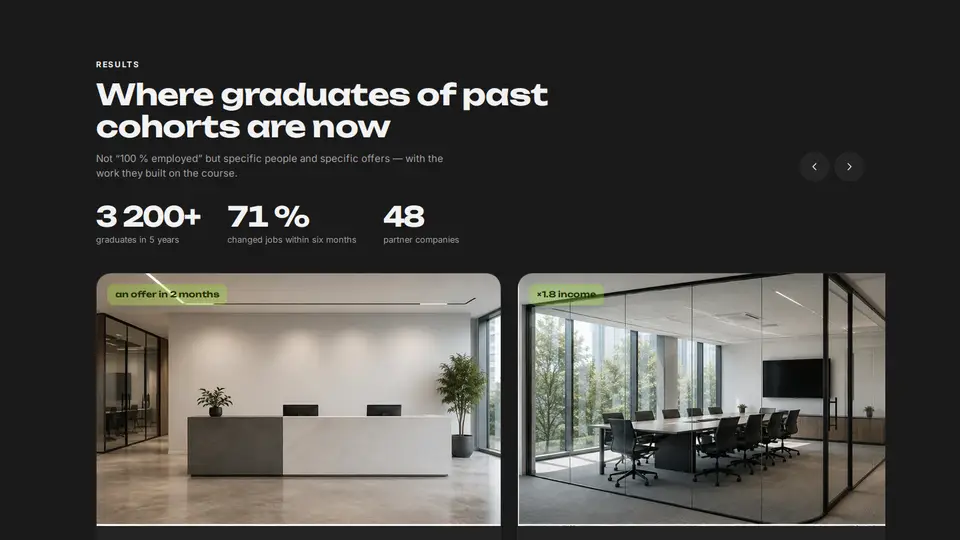
Graduate results as a horizontal lane: large cards with a 16:10 project screenshot, scroll-snap, draggable with the mouse and the wheel, arrows at the edges. Counters above the lane count up on appearance. Each card has a cursor sheen and a “before → after” arrow that draws itself when the card is in view.
React + Tailwind, shadcn-compatible: press “Copy for AI” and your Cursor or Claude Code agent installs it with the shadcn CLI.
What you can change
- cases: names, portraits, screenshots, before/after, gain, quote, link
- stats: values, suffixes, labels; eyebrow, title, lede, beforeLabel, afterLabel, linkLabel
- accent and background, tone
Built from
The install command brings these components too. The block only passes them props: their palette and behaviour stay their own.
A link for your AI agent: preview, code and instructions.
Preview
Use it with AI
- 1. Copy the link.
- 2. Write to your agent in your own words and drop the link into the sentence.
- 3. The agent opens the link and installs the component from the registry.
put this on the home page as the hero:
https://vibeui.club/c/course-003?lang=en&theme=dark
Not sure where to paste it? Step-by-step guide
Show the full instructions
What the link says, spelled out. Use it when your agent cannot open links — paste this text instead.
Loading…
How to use
<Course003
  title="Where graduates of past cohorts are now"
  stats={[{ value: 3200, suffix: "+", label: "graduates" }, { value: 71, suffix: " %", label: "changed jobs" }]}
  cases={[
    { name: "Artem Gusev", image: "/photos/graduate-01.webp", work: "/photos/work-01.webp", before: "marketer, 4 years", after: "product designer, Ozon", gain: "an offer in 2 months", quote: "Showed the case at the interview — hired without a test task.", href: "/cases/artem" },
  ]}
/>
A sample call. The agent installs the component itself from the registry via the “Copy for AI” link.
Settings
- Theme
tone· default: auto- Title
title· default: Where graduates of past cohorts are now- Accent
accent· default: theme colour- Background
background· default: theme colour
Used in scenarios
- Online courseResults
More in Industry sections
FAQ
- How do I add Graduate results as a horizontal lane with Cursor or Claude Code?
- Press “Copy for AI” on this page and paste it into your agent's chat. The instruction contains the shadcn CLI install command, the dependencies and what to keep, so the agent installs this exact component instead of recreating a lookalike.
- What does Graduate results as a horizontal lane depend on?
- No npm packages beyond React and Tailwind CSS. It also installs catalog components: card-091.
- What can I change in Graduate results as a horizontal lane?
- Adapt: cases: names, portraits, screenshots, before/after, gain, quote, link; stats: values, suffixes, labels; eyebrow, title, lede, beforeLabel, afterLabel, linkLabel; accent and background, tone. Keep as installed: the card-091 imports from @/components/vibeui/ — do not inline their code into the block or swap in your own; the parts receive props only; the horizontal lane with scroll-snap and mouse drag — cases are browsed, not squeezed into a grid; counters counting up on appearance and the “before → after” arrow drawing itself in view.
- Is Graduate results as a horizontal lane free?
- The preview is open to everyone; the source is available with a PRO subscription.
For developers
npx shadcn@latest add https://vibeui.club/r/pro/course-003.jsonThis command needs a signed link: sign in and open “Component source” below — it issues a working link valid for 30 minutes. All install options
Technical notes
A composite block: imports card-091 from @/components/vibeui/ — the install command brings them along with the block. The block owns the layout and its own text, passes the parts props only and leaves their --vibeui-<name>-* palettes alone. One file, zero npm dependencies, “use client” for drag, counters and the sheen. The lane is a <ul> with overflow-x:auto, scroll-snap-type:x mandatory, a hidden scrollbar and negative margins to the shell edge. Drag uses pointer capture for the mouse: movement over 4px switches data-drag (snap off, user-select:none), a click after a drag is cancelled in onClickCapture. Arrows scrollBy one card width. Counters use an IntersectionObserver on the section and a 1.4 s requestAnimationFrame with easeOut. The sheen is an ::after radial-gradient at --mx/--my from pointermove. The arrow is an SVG path with stroke-dasharray, dashoffset→0 on data-seen (IO with root=lane, threshold .6). From 64rem (container query) a card is 56 % wide. Palette --vibeui-course-003-* is neutral: ink and paper via light-dark(), the site colours come through the accent, ink and background props; Unbounded and Inter via <link precedence> from Google Fonts with system fallbacks. tone pins the scheme, accent, ink and background override colours.
Tags
- course
- education
- edtech
- landing
- results
- carousel
- scroll-snap
- counter
- before-after
- composite
Component source
The same file your agent installs. Here in case you would rather copy it by hand.
Loading…