Industry sections
Live balance: the chart draws itself, operations appear, the period morphs the line
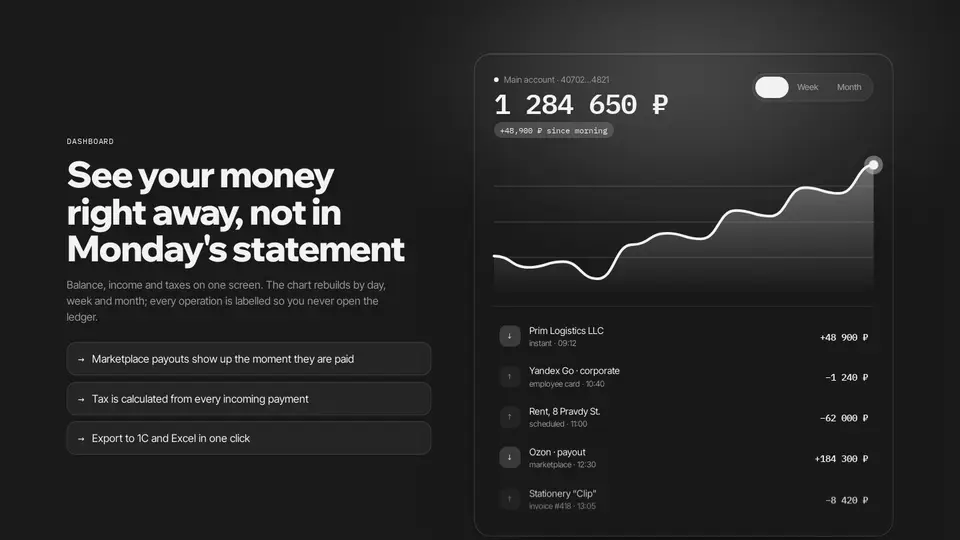
A dashboard widget next to the text: a glass panel with a monospace balance, a change chip and a day / week / month switch. When the widget reaches the viewport the SVG area draws itself via pathLength, the balance counts up and operations appear one by one. Switching the period interpolates the chart points through requestAnimationFrame and reveals the list again.
React + Tailwind, shadcn-compatible: press “Copy for AI” and your Cursor or Claude Code agent installs it with the shadcn CLI.
What you can change
- eyebrow, title, lede, facts
- account, currency
- periods: label, balance, delta, points (8–16 numbers), operations: title, note, amount
A link for your AI agent: preview, code and instructions.
Preview
Use it with AI
- 1. Copy the link.
- 2. Write to your agent in your own words and drop the link into the sentence.
- 3. The agent opens the link and installs the component from the registry.
put this on the home page as the hero:
https://vibeui.club/c/fintech-001?lang=en&theme=dark
Not sure where to paste it? Step-by-step guide
Show the full instructions
What the link says, spelled out. Use it when your agent cannot open links — paste this text instead.
Loading…
How to use
<Fintech001
  title="See your money right away"
  periods={[{ label: "Week", balance: 1284650, delta: "+12.4%", points: [40, 44, 50, 55, 61, 66, 78], operations: [{ title: "Ozon · payout", note: "Thu", amount: 184300 }] }]}
/>
A sample call. The agent installs the component itself from the registry via the “Copy for AI” link.
Settings
- Title
title· default: See your money right away, not in Monday's statement- Account
account· default: Main account · 40702…4821- Theme
tone· default: auto- Accent
accent· default: theme colour- Ink
ink· default: theme colour- Background
background· default: theme colour
Used in scenarios
- Business fintechLive balance
More in Industry sections
- Fee savings calculator with a turnover slider
- Security on scroll: the card passes through four layers of protection
- Sunrise in 30 minutes: a sticky scene where the room brightens on scroll
- Gadget exploded view: parts spread apart by a slider and in the viewport
- Gadget preorder: swatches recolour the lamp, a shipping countdown, a magnetic button
- Level test: five chip questions and an A1–C1 scale with a marker
FAQ
- How do I add Live balance: the chart draws itself, operations appear, the period morphs the line with Cursor or Claude Code?
- Press “Copy for AI” on this page and paste it into your agent's chat. The instruction contains the shadcn CLI install command, the dependencies and what to keep, so the agent installs this exact component instead of recreating a lookalike.
- What does Live balance: the chart draws itself, operations appear, the period morphs the line depend on?
- No npm packages beyond React and Tailwind CSS.
- What can I change in Live balance: the chart draws itself, operations appear, the period morphs the line?
- Adapt: eyebrow, title, lede, facts; account, currency; periods: label, balance, delta, points (8–16 numbers), operations: title, note, amount. Keep as installed: the imports from @/components/vibeui/ — do not inline their code into the block or swap in your own; the parts receive props only; appearance — an IntersectionObserver with threshold .3 sets data-visible, the line animates stroke-dashoffset 1 → 0 with pathLength=1, the area fades in with a delay; morphing — points and balance interpolate over 700 ms with ease-out via requestAnimationFrame, the from value comes from a ref so an interrupted animation continues from where it is.
- Is Live balance: the chart draws itself, operations appear, the period morphs the line free?
- The preview is open to everyone; the source is available with a PRO subscription.
For developers
npx shadcn@latest add https://vibeui.club/r/pro/fintech-001.jsonThis command needs a signed link: sign in and open “Component source” below — it issues a working link valid for 30 minutes. All install options
Technical notes
A composite block: imports from @/components/vibeui/ — the install command brings them along with the block. The block owns the layout and its own text, passes the parts props only and leaves their --vibeui-<name>-* palettes alone.
Tags
- fintech
- dashboard
- balance
- chart
- area
- svg
- transactions
- period
- toggle
- animation
- glass
- composite
Component source
The same file your agent installs. Here in case you would rather copy it by hand.
Loading…