Industry sections
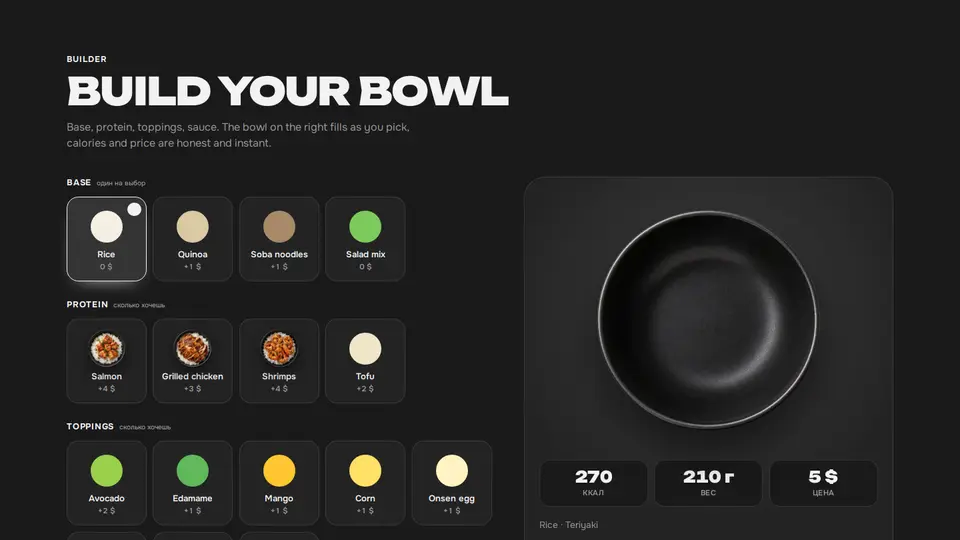
Bowl builder: ingredient photos drop into the bowl, calories and price on the fly
A bowl builder for food delivery: on the left, ingredient groups as tiles with real cut-out photos — base and sauce pick one, proteins and toppings as many as you like, the chosen tile gets a check mark. On the right, the bowl from above: the base settles as a circle inside, proteins and toppings drop in with a bounce and arrange in a ring, the sauce stands in a dish at the edge. Below the bowl, calories, weight and price update on the fly, and the “add to cart” button sends vibeui-cart:add.
React + Tailwind, shadcn-compatible: press “Copy for AI” and your Cursor or Claude Code agent installs it with the shadcn CLI.
What you can change
- eyebrow, title, lede, addLabel, addedLabel
- groups: id, title, mode (single | multi), options: id, name, price, kcal, color (fallback), image (cut-out ingredient photo)
- bowlImage (an empty bowl from above, no background), basePrice, currency
A link for your AI agent: preview, code and instructions.
Preview
Use it with AI
- 1. Copy the link.
- 2. Write to your agent in your own words and drop the link into the sentence.
- 3. The agent opens the link and installs the component from the registry.
put this on the home page as the hero:
https://vibeui.club/c/delivery-002?lang=en&theme=dark
Not sure where to paste it? Step-by-step guide
Show the full instructions
What the link says, spelled out. Use it when your agent cannot open links — paste this text instead.
Loading…
How to use
<Delivery002
  title="Build your bowl"
  basePrice={290}
  bowlImage="/photos/bowl-empty.webp"
  groups={[
    { id: "base", title: "Base", mode: "single", options: [{ id: "rice", name: "Rice", price: 0, kcal: 210, color: "#f4efe2", image: "/photos/base-rice.webp" }] },
    { id: "protein", title: "Protein", mode: "multi", options: [{ id: "salmon", name: "Salmon", price: 220, kcal: 180, color: "#ff8a6b", image: "/photos/protein-salmon.webp" }] },
  ]}
/>
A sample call. The agent installs the component itself from the registry via the “Copy for AI” link.
Settings
- Title
title· default: Build your bowl- Base price
basePrice· default: 5- Theme
tone· default: auto- Accent
accent· default: theme colour- Ink
ink· default: theme colour- Background
background· default: theme colour
Used in scenarios
- Food deliveryBuilder
More in Industry sections
- Delivery zones on a Yandex map: zone rings around the kitchen, address pins, click → time and price
- Order tracker: steps with live progress and a phone with a map where the courier drives
- Sticker reviews with emoji reactions and a live orders counter
- Bouquet catalogue as a list: the image follows the cursor
- Bouquet builder: stems grow in the vase, price and lifetime are computed
- Delivery to the hour: a time tape from the current moment and an order form
FAQ
- How do I add Bowl builder: ingredient photos drop into the bowl, calories and price on the fly with Cursor or Claude Code?
- Press “Copy for AI” on this page and paste it into your agent's chat. The instruction contains the shadcn CLI install command, the dependencies and what to keep, so the agent installs this exact component instead of recreating a lookalike.
- What does Bowl builder: ingredient photos drop into the bowl, calories and price on the fly depend on?
- No npm packages beyond React and Tailwind CSS.
- What can I change in Bowl builder: ingredient photos drop into the bowl, calories and price on the fly?
- Adapt: eyebrow, title, lede, addLabel, addedLabel; groups: id, title, mode (single | multi), options: id, name, price, kcal, color (fallback), image (cut-out ingredient photo); bowlImage (an empty bowl from above, no background), basePrice, currency. Keep as installed: picked is an array of ids in pick order; single groups replace their option, multi groups toggle; ingredients are top-down cut-out photos with the same angle and light; the base is a circle inset 14% inside the bowl, proteins 34%, toppings 25% of the bowl width; spot(i, n) places items in a ring, left/top with a transition — on a new ingredient the others slide over; appearance is the drop keyframes on the img.
- Is Bowl builder: ingredient photos drop into the bowl, calories and price on the fly free?
- The preview is open to everyone; the source is available with a PRO subscription.
For developers
npx shadcn@latest add https://vibeui.club/r/pro/delivery-002.jsonThis command needs a signed link: sign in and open “Component source” below — it issues a working link valid for 30 minutes. All install options
Tags
- delivery
- builder
- configurator
- bowl
- poke
- ingredients
- calories
- calculator
- food
- interactive
- event
- photo tiles
- drop animation
Component source
The same file your agent installs. Here in case you would rather copy it by hand.
Loading…