Industry sections
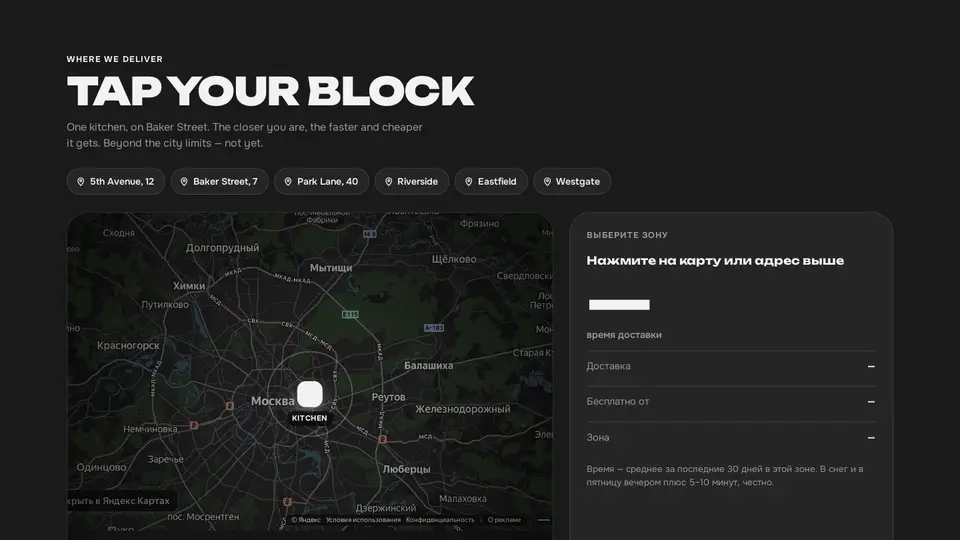
Delivery zones on a Yandex map: zone rings around the kitchen, address pins, click → time and price
A “where we deliver” section on a real map: a Yandex Maps widget (no API key) darkened for a dark theme, with three zone rings around the kitchen, a pulsing kitchen and pins for frequent addresses converted from coordinates with the Mercator projection. A click on the map picks the zone by distance to the kitchen and drops a pin; address pins and chips pick the address's zone. On the right: minutes in large type, delivery fee, free-delivery threshold and zone name. The choice goes out as a vibeui-cart:zone event.
React + Tailwind, shadcn-compatible: press “Copy for AI” and your Cursor or Claude Code agent installs it with the shadcn CLI.
What you can change
- eyebrow, title, lede, kitchenLabel, currency
- kitchen ([longitude, latitude]), zoom, mapLang (ru_RU, en_US)
- zones: id, name, minutes, fee, freeFrom, radius (km, nearest first)
A link for your AI agent: preview, code and instructions.
Preview
Use it with AI
- 1. Copy the link.
- 2. Write to your agent in your own words and drop the link into the sentence.
- 3. The agent opens the link and installs the component from the registry.
put this on the home page as the hero:
https://vibeui.club/c/delivery-003?lang=en&theme=dark
Not sure where to paste it? Step-by-step guide
Show the full instructions
What the link says, spelled out. Use it when your agent cannot open links — paste this text instead.
Loading…
How to use
<Delivery003
  title="Tap your block"
  currency="$"
  zones={[
    { id: "near", name: "Downtown", minutes: 25, fee: 0, freeFrom: 0 },
    { id: "mid", name: "Inner ring", minutes: 35, fee: 3, freeFrom: 25 },
    { id: "far", name: "City limits", minutes: 50, fee: 5, freeFrom: 40 },
  ]}
  addresses={[{ label: "5th Avenue, 12", zone: "near" }, { label: "Riverside", zone: "mid" }]}
/>
A sample call. The agent installs the component itself from the registry via the “Copy for AI” link.
Settings
- Title
title· default: Tap your block- Kitchen label
kitchenLabel· default: kitchen- Theme
tone· default: auto- Accent
accent· default: theme colour- Ink
ink· default: theme colour- Background
background· default: theme colour
Used in scenarios
- Food deliveryDelivery zone
More in Industry sections
- Order tracker: steps with live progress and a phone with a map where the courier drives
- Sticker reviews with emoji reactions and a live orders counter
- Bouquet catalogue as a list: the image follows the cursor
- Bouquet builder: stems grow in the vase, price and lifetime are computed
- Delivery to the hour: a time tape from the current moment and an order form
- Seasonal calendar: 12 months as a drag-scroll ribbon
FAQ
- How do I add Delivery zones on a Yandex map: zone rings around the kitchen, address pins, click → time and price with Cursor or Claude Code?
- Press “Copy for AI” on this page and paste it into your agent's chat. The instruction contains the shadcn CLI install command, the dependencies and what to keep, so the agent installs this exact component instead of recreating a lookalike.
- What does Delivery zones on a Yandex map: zone rings around the kitchen, address pins, click → time and price depend on?
- No npm packages beyond React and Tailwind CSS.
- What can I change in Delivery zones on a Yandex map: zone rings around the kitchen, address pins, click → time and price?
- Adapt: eyebrow, title, lede, kitchenLabel, currency; kitchen ([longitude, latitude]), zoom, mapLang (ru_RU, en_US); zones: id, name, minutes, fee, freeFrom, radius (km, nearest first). Keep as installed: the map is a yandex.ru/map-widget iframe with ll/z/lang, pointer-events:none and a darkening CSS filter; it must not move, or the overlay drifts; pins use toPixels (Web Mercator, 256 tile) from the kitchen in pixels, rings are radius / kmPerPixel; values are rounded so SSR and client match; a click on the overlay: pixel distance × kmPerPixel → the first zone whose radius ≥ distance; beyond the last one — nothing.
- Is Delivery zones on a Yandex map: zone rings around the kitchen, address pins, click → time and price free?
- The preview is open to everyone; the source is available with a PRO subscription.
For developers
npx shadcn@latest add https://vibeui.club/r/pro/delivery-003.jsonThis command needs a signed link: sign in and open “Component source” below — it issues a working link valid for 30 minutes. All install options
Tags
- delivery
- map
- zones
- area
- city
- address
- eta
- fee
- interactive
- event
- yandex maps
- geo
- radius
Component source
The same file your agent installs. Here in case you would rather copy it by hand.
Loading…