Chart
Conversion Funnel
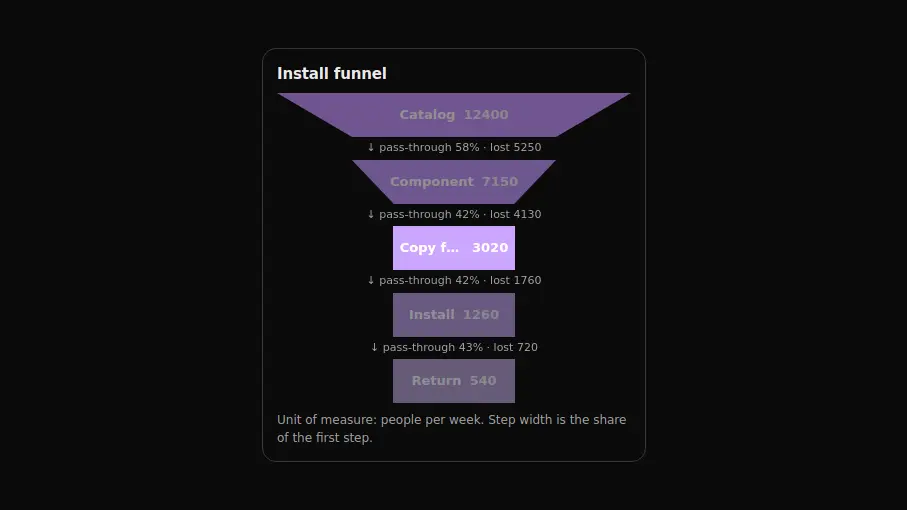
A sales funnel: the steps narrow from top to bottom and the conversion rate is spelled out between them. Suits a marketing report. Change the steps, the numbers and the labels.
React + Tailwind, shadcn-compatible: press “Copy for AI” and your Cursor or Claude Code agent installs it with the shadcn CLI.
What you can change
- the steps array: a label and a value per step
- title — the funnel heading
- unit — the unit named in the caption under the funnel
A link for your AI agent: preview, code and instructions.
Preview
Use it with AI
- 1. Copy the link.
- 2. Write to your agent in your own words and drop the link into the sentence.
- 3. The agent opens the link and installs the component from the registry.
put this on the home page as the hero:
https://vibeui.club/c/chart-017?lang=en&theme=dark
Not sure where to paste it? Step-by-step guide
Show the full instructions
What the link says, spelled out. Use it when your agent cannot open links — paste this text instead.
Loading…
How to use
<Chart017
  title="Install funnel"
  unit="people per week"
  steps={[{ label: "Opened the catalog", value: 12400 }]}
/>
A sample call. The agent installs the component itself from the registry via the “Copy for AI” link.
Settings
- Heading
title· default: Install funnel- Unit
unit· default: people per week- Accent
accent· default: theme colour- Background
background· default: theme colour- Entrance animation
animate· default: on
More in Chart
FAQ
- How do I add Conversion Funnel with Cursor or Claude Code?
- Press “Copy for AI” on this page and paste it into your agent's chat. The instruction contains the shadcn CLI install command, the dependencies and what to keep, so the agent installs this exact component instead of recreating a lookalike.
- What does Conversion Funnel depend on?
- No npm packages beyond React and Tailwind CSS.
- What can I change in Conversion Funnel?
- Adapt: the steps array: a label and a value per step; title — the funnel heading; unit — the unit named in the caption under the funnel. Keep as installed: the local --vibeui-chart-017-* palette — do not swap it for your theme tokens (bg-card, --chart-1 and the like); the clip-path trapezoid: the slope between steps is the loss, and rectangles cannot show it; the pass-through rate between steps — that is what says where people are lost.
- Is Conversion Funnel free?
- Yes. The preview is open without an account; with a free account you can copy up to 20 components a month.
For developers
npx shadcn@latest add https://vibeui.club/r/pro/chart-017.jsonThis command needs a signed link: sign in and open “Component source” below — it issues a working link valid for 30 minutes. All install options
Technical notes
The component is self-contained: one file, zero dependencies, its own palette in the local --vibeui-chart-017-* variables. Server component: no hooks. The step shape lives entirely in clip-path: polygon, and the corner coordinates arrive in four CSS variables computed from the step's share and the next step's share, so the figure stretches with the container and needs neither SVG nor pseudo-elements with borders. The step width is floored at about a third of the width: a narrow step does not collapse into a line and still fits the number and the tail of the label. The label inside a step is narrowed by padding down to the trapezoid width at the line height and is cut with an ellipsis instead of being sliced mid-letter by the clip-path. The data is mirrored in a visually hidden table. Motion: funnel steps unfold top to bottom, the transition rates fade in; reduced motion shows everything at once; animate=false turns it off.
Tags
- funnel
- conversion
- clip-path
- analytics
- animated
Component source
The same file your agent installs. Here in case you would rather copy it by hand.
Loading…