Chart
Radar Web
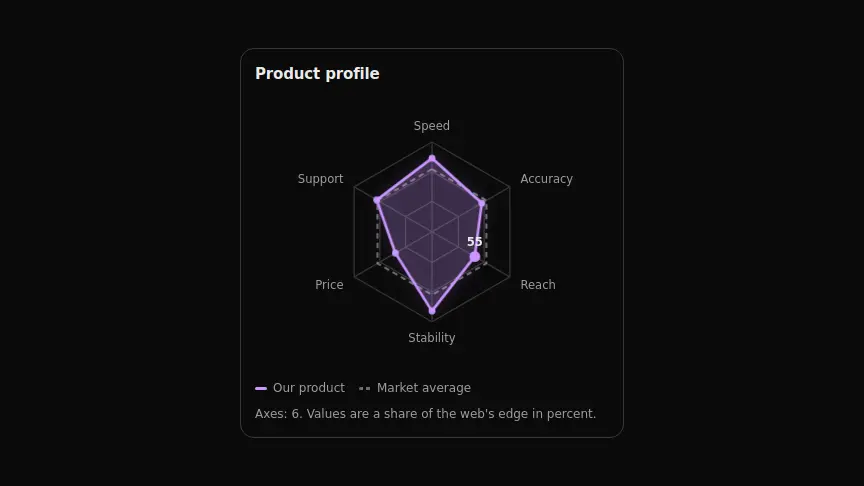
A radar compares the whole profile: the polygon's shape shows where things sag relative to the rest, and the dashed outline keeps a benchmark alongside.
React + Tailwind, shadcn-compatible: press “Copy for AI” and your Cursor or Claude Code agent installs it with the shadcn CLI.
What you can change
- the axes through axes: label and a 0–100 value on each
- the comparison outline through compare — its length has to match the number of axes
- the legend captions through seriesLabel and compareLabel
A link for your AI agent: preview, code and instructions.
Preview
Use it with AI
- 1. Copy the link.
- 2. Write to your agent in your own words and drop the link into the sentence.
- 3. The agent opens the link and installs the component from the registry.
put this on the home page as the hero:
https://vibeui.club/c/chart-027?lang=en&theme=dark
Not sure where to paste it? Step-by-step guide
Show the full instructions
What the link says, spelled out. Use it when your agent cannot open links — paste this text instead.
Loading…
How to use
<Chart027
  title="Product profile"
  axes={[{ label: "Speed", value: 82 }, { label: "Price", value: 47 }]}
  compare={[70, 70]}
/>
A sample call. The agent installs the component itself from the registry via the “Copy for AI” link.
Settings
- Heading
title· default: Product profile- Series caption
seriesLabel· default: Our product- Accent
accent· default: theme colour- Background
background· default: theme colour- Entrance animation
animate· default: on
More in Chart
FAQ
- How do I add Radar Web with Cursor or Claude Code?
- Press “Copy for AI” on this page and paste it into your agent's chat. The instruction contains the shadcn CLI install command, the dependencies and what to keep, so the agent installs this exact component instead of recreating a lookalike.
- What does Radar Web depend on?
- No npm packages beyond React and Tailwind CSS.
- What can I change in Radar Web?
- Adapt: the axes through axes: label and a 0–100 value on each; the comparison outline through compare — its length has to match the number of axes; the legend captions through seriesLabel and compareLabel. Keep as installed: the local --vibeui-chart-027-* palette: the component must look the same in any project; the hidden data table: the SVG is aria-hidden, and without it the chart is unreachable for a screen reader; the shared 0…100 scale across axes — on mixed scales the polygon's shape loses meaning.
- Is Radar Web free?
- Yes. The preview is open without an account; with a free account you can copy up to 20 components a month.
For developers
npx shadcn@latest add https://vibeui.club/r/pro/chart-027.jsonThis command needs a signed link: sign in and open “Component source” below — it issues a working link valid for 30 minutes. All install options
Technical notes
One file, zero dependencies, the --vibeui-chart-027-* palette. A server component. The points are trigonometry from the centre: the first spoke points up, the rest run clockwise. The web is three concentric polygons of the same shape as the data, so the levels read along the spokes. Axis labels anchor by side: start on the right, end on the left, middle top and bottom — otherwise the left-hand labels ride over the figure. The second outline is dashed and appears only when compare matches the number of axes. Values are percentages of the web's edge: a shared scale is mandatory, or the shape means nothing. The data is mirrored in a hidden table and the SVG is aria-hidden. Motion: the polygon unfolds from the centre, nodes pop in, hovering an axis highlights the value; reduced motion shows everything at once; animate=false turns it off.
Tags
- chart
- radar
- comparison
- profile
- animated
Component source
The same file your agent installs. Here in case you would rather copy it by hand.
Loading…