Chart
Activity Ribbon
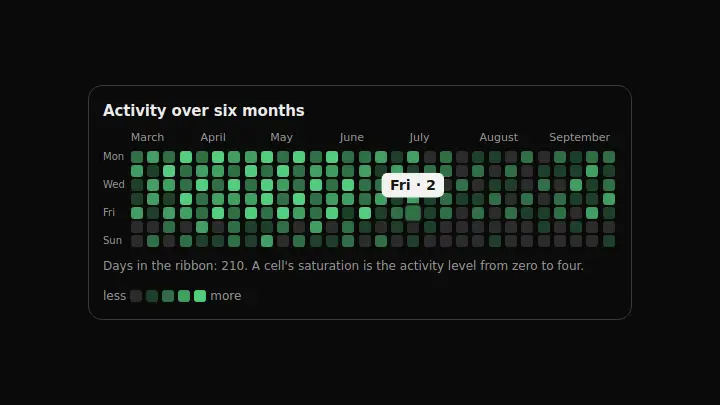
Half a year as one ribbon: a cell is a day, a column is a week, and the question it answers is not "how much exactly" but "where the gaps are and how long a streak holds".
React + Tailwind, shadcn-compatible: press “Copy for AI” and your Cursor or Claude Code agent installs it with the shadcn CLI.
What you can change
- the ribbon through weeks: an array of weeks with seven 0…4 levels each
- the month captions through months and the day captions through days — an empty string in days hides one
- the heading through title and the caption through unitLabel with the {count} placeholder
A link for your AI agent: preview, code and instructions.
Preview
Use it with AI
- 1. Copy the link.
- 2. Write to your agent in your own words and drop the link into the sentence.
- 3. The agent opens the link and installs the component from the registry.
put this on the home page as the hero:
https://vibeui.club/c/chart-029?lang=en&theme=dark
Not sure where to paste it? Step-by-step guide
Show the full instructions
What the link says, spelled out. Use it when your agent cannot open links — paste this text instead.
Loading…
How to use
<Chart029
  title="Activity over six months"
  weeks={[[0, 1, 2, 3, 4, 1, 0]]}
  months={["March", "April"]}
/>
A sample call. The agent installs the component itself from the registry via the “Copy for AI” link.
Settings
- Heading
title· default: Activity over six months- "Less" caption
lessLabel· default: less- "More" caption
moreLabel· default: more- Accent
accent· default: theme colour- Background
background· default: theme colour- Entrance animation
animate· default: on
More in Chart
FAQ
- How do I add Activity Ribbon with Cursor or Claude Code?
- Press “Copy for AI” on this page and paste it into your agent's chat. The instruction contains the shadcn CLI install command, the dependencies and what to keep, so the agent installs this exact component instead of recreating a lookalike.
- What does Activity Ribbon depend on?
- No npm packages beyond React and Tailwind CSS.
- What can I change in Activity Ribbon?
- Adapt: the ribbon through weeks: an array of weeks with seven 0…4 levels each; the month captions through months and the day captions through days — an empty string in days hides one; the heading through title and the caption through unitLabel with the {count} placeholder. Keep as installed: the local --vibeui-chart-029-* palette: the component must look the same in any project; the five level steps: a continuous scale on a cell this size is indistinguishable; the ribbon scrolling inside itself — half a year of cells is wider than a phone, and the page must not stretch.
- Is Activity Ribbon free?
- Yes. The preview is open without an account; with a free account you can copy up to 20 components a month.
For developers
npx shadcn@latest add https://vibeui.club/r/pro/chart-029.jsonThis command needs a signed link: sign in and open “Component source” below — it issues a working link valid for 30 minutes. All install options
Technical notes
One file, zero dependencies, the --vibeui-chart-029-* palette. A server component with no SVG: the ribbon is a CSS Grid with grid-auto-flow:column, so weeks run as columns and days as rows. The level is a number 0…4 rather than the raw value: five steps are distinguishable by eye, a continuous scale on a 12×12 cell is not. The steps are built with color-mix from the accent, so one variable repaints the whole chart. The ribbon scrolls inside itself (overflow-x:auto with overscroll-behavior:contain) instead of stretching the page. The month and day captions are aria-hidden; the summary lives in a hidden table. Motion: cells fade in week by week left to right, hover shows the day and value; reduced motion shows everything at once; animate=false turns it off.
Tags
- chart
- heatmap
- activity
- calendar
- animated
Component source
The same file your agent installs. Here in case you would rather copy it by hand.
Loading…