Specialized inputs
Country Search
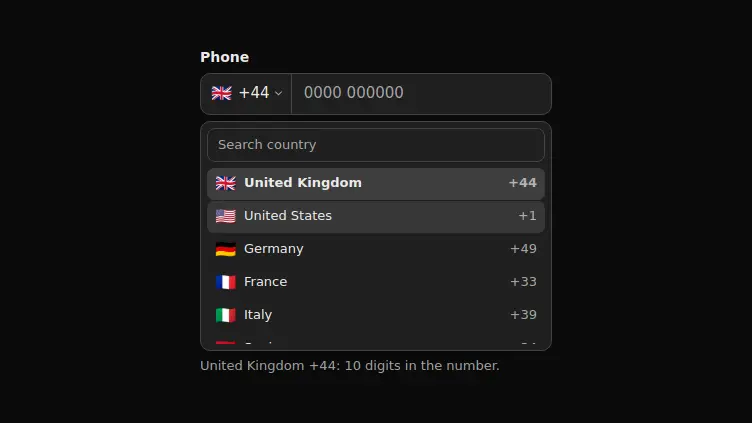
A phone field where the country is picked from a searchable list: the query filters by name and dial code, and the chosen country sets the number mask.
React + Tailwind, shadcn-compatible: press “Copy for AI” and your Cursor or Claude Code agent installs it with the shadcn CLI.
What you can change
- the field name through label and the country set with masks through countries
- the captions: searchPlaceholder on the search, countryLabel on the country button, emptyText for an empty result
- the hint template with the {country}, {code} and {digits} placeholders
A link for your AI agent: preview, code and instructions.
Preview
Use it with AI
- 1. Copy the link.
- 2. Write to your agent in your own words and drop the link into the sentence.
- 3. The agent opens the link and installs the component from the registry.
put this on the home page as the hero:
https://vibeui.club/c/phoneinput-009?lang=en&theme=dark
Not sure where to paste it? Step-by-step guide
Show the full instructions
What the link says, spelled out. Use it when your agent cannot open links — paste this text instead.
Loading…
How to use
<Phoneinput009
  label="Phone"
  countries={[{ flag: "🇩🇪", code: "+49", name: "Germany", mask: "#### #######" }]}
/>
A sample call. The agent installs the component itself from the registry via the “Copy for AI” link.
Settings
- Label
label· default: Phone- Search
searchPlaceholder· default: Search country- Hint
hint· default: {country} {code}: {digits} digits in the number.- Accent
accent· default: theme colour- Background
background· default: theme colour
More in Specialized inputs
FAQ
- How do I add Country Search with Cursor or Claude Code?
- Press “Copy for AI” on this page and paste it into your agent's chat. The instruction contains the shadcn CLI install command, the dependencies and what to keep, so the agent installs this exact component instead of recreating a lookalike.
- What does Country Search depend on?
- No npm packages beyond React and Tailwind CSS.
- What can I change in Country Search?
- Adapt: the field name through label and the country set with masks through countries; the captions: searchPlaceholder on the search, countryLabel on the country button, emptyText for an empty result; the hint template with the {country}, {code} and {digits} placeholders. Keep as installed: the local --vibeui-phoneinput-009-* palette — do not swap it for your theme tokens; the custom listbox instead of a native select: on a list of two hundred countries the native one is scrolled by wheel all the way to Uruguay; search over both the name and the dial code — a person remembers either "Germany" or "+49", and you cannot know which.
- Is Country Search free?
- The preview is open to everyone; the source is available with a PRO subscription.
For developers
npx shadcn@latest add https://vibeui.club/r/pro/phoneinput-009.jsonThis command needs a signed link: sign in and open “Component source” below — it issues a working link valid for 30 minutes. All install options
Technical notes
A client component: the country, the search query and the raw digits live in useState. One file, no dependencies, the palette in the local --vibeui-phoneinput-009-* variables. The country picker is not a native select but a listbox of its own: a button with the flag and the dial code opens a panel with a search field and a list marked up as listbox and option. The search filters by name and by dial code, the up and down arrows move the active row across the matches, Enter picks, Escape closes and returns focus to the button; the active row is announced through aria-activedescendant instead of moving focus. The panel closes when focus leaves the block: onBlur compares relatedTarget against the block contents. The flag is an emoji, so there are no images and no icon packages. The mask lives in the country record: input is normalised to digits, so "+7 (999) 123-45-67" pasted from the clipboard becomes the same number as one typed by hand. The open prop unfolds the list in flow — that is the showcase and screenshot mode.
Tags
- phone
- country
- search
- listbox
- client
Component source
The same file your agent installs. Here in case you would rather copy it by hand.
Loading…