Calendar
Locked Past
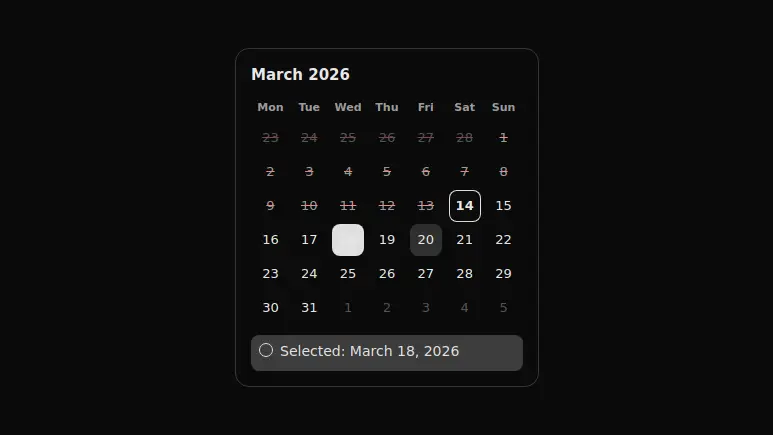
A month with a locked past: an unavailable day does not stay silent on click, it shows a written reason for the refusal under the grid.
React + Tailwind, shadcn-compatible: press “Copy for AI” and your Cursor or Claude Code agent installs it with the shadcn CLI.
What you can change
- the reference date through today and the preselected one through defaultValue
- the explanation text through reason
- the lines under the grid through selectedText and deniedText, and the locked day label through unavailableText
A link for your AI agent: preview, code and instructions.
Preview
Use it with AI
- 1. Copy the link.
- 2. Write to your agent in your own words and drop the link into the sentence.
- 3. The agent opens the link and installs the component from the registry.
put this on the home page as the hero:
https://vibeui.club/c/calendar-013?lang=en&theme=dark
Not sure where to paste it? Step-by-step guide
Show the full instructions
What the link says, spelled out. Use it when your agent cannot open links — paste this text instead.
Loading…
How to use
<Calendar013
  today="2026-03-14"
  defaultValue="2026-03-18"
  reason="Booking closes a day ahead: past dates cannot be picked"
/>
A sample call. The agent installs the component itself from the registry via the “Copy for AI” link.
Settings
- Refusal reason
reason· default: Booking closes a day ahead: past dates cannot be picked- Today
today· default: 2026-03-14- Label language
locale· default: ru-RU- Accent
accent· default: theme colour- Surface
background· default: theme colour
More in Calendar
FAQ
- How do I add Locked Past with Cursor or Claude Code?
- Press “Copy for AI” on this page and paste it into your agent's chat. The instruction contains the shadcn CLI install command, the dependencies and what to keep, so the agent installs this exact component instead of recreating a lookalike.
- What does Locked Past depend on?
- No npm packages beyond React and Tailwind CSS.
- What can I change in Locked Past?
- Adapt: the reference date through today and the preselected one through defaultValue; the explanation text through reason; the lines under the grid through selectedText and deniedText, and the locked day label through unavailableText. Keep as installed: the local --vibeui-calendar-013-* palette — otherwise the installed component will not match the preview; aria-disabled instead of disabled: a locked button must accept focus and clicks, or there is nowhere to explain the refusal; role=status with aria-live on the reason line: without them a blind user presses a day and hears nothing.
- Is Locked Past free?
- Yes. The preview is open without an account; with a free account you can copy up to 20 components a month.
For developers
npx shadcn@latest add https://vibeui.club/r/pro/calendar-013.jsonThis command needs a signed link: sign in and open “Component source” below — it issues a working link valid for 30 minutes. All install options
Technical notes
A client component: useState holds the selected date and the text of the last refusal. Past days are marked aria-disabled rather than with the disabled attribute — such a button stays in the tab order and accepts a press, so instead of a dead click the reason is shown. The "has it passed" comparison is done with ISO strings rather than Date objects: a YYYY-MM-DD string comparison is correct and does not depend on the time zone. The reference day arrives as the today prop as a string rather than from new Date() — otherwise the server and the client render would drift apart. A closed day is struck through, not merely dimmed: dimness alone does not tell it apart from a day of a neighbouring month. The status line lives with role=status and aria-live, so the reason is read out right after the press.
Tags
- calendar
- disabled
- booking
- a11y
Component source
The same file your agent installs. Here in case you would rather copy it by hand.
Loading…