Calendar
ISO Week Grid
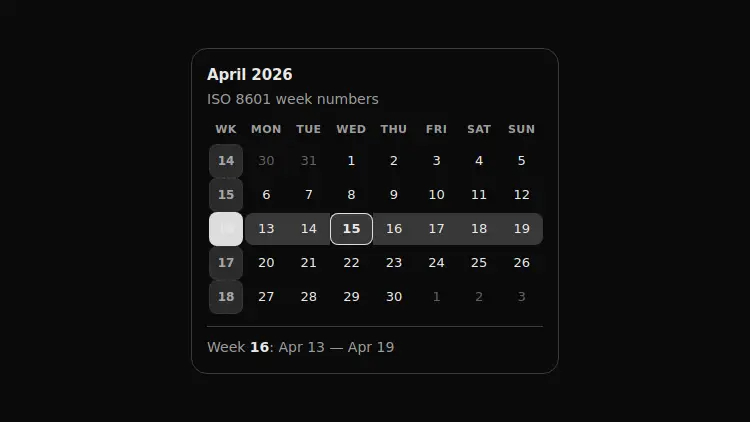
A month grid with an ISO 8601 week-number column: you pick the whole row rather than a day, and the caption below turns “week 16” into real dates.
React + Tailwind, shadcn-compatible: press “Copy for AI” and your Cursor or Claude Code agent installs it with the shadcn CLI.
What you can change
- month — the displayed month as a YYYY-MM string
- locale — the locale for month and weekday labels
- today — the reference date for the “today” outline
A link for your AI agent: preview, code and instructions.
Preview
Use it with AI
- 1. Copy the link.
- 2. Write to your agent in your own words and drop the link into the sentence.
- 3. The agent opens the link and installs the component from the registry.
put this on the home page as the hero:
https://vibeui.club/c/calendar-021?lang=en&theme=dark
Not sure where to paste it? Step-by-step guide
Show the full instructions
What the link says, spelled out. Use it when your agent cannot open links — paste this text instead.
Loading…
How to use
<Calendar021 month="2026-04" defaultWeek={16} />A sample call. The agent installs the component itself from the registry via the “Copy for AI” link.
Settings
- Month
month· default: 2026-04- Caption
hint· default: ISO 8601 week numbers- Locale
locale· default: ru-RU- Accent
accent· default: theme colour- Surface
background· default: theme colour
More in Calendar
FAQ
- How do I add ISO Week Grid with Cursor or Claude Code?
- Press “Copy for AI” on this page and paste it into your agent's chat. The instruction contains the shadcn CLI install command, the dependencies and what to keep, so the agent installs this exact component instead of recreating a lookalike.
- What does ISO Week Grid depend on?
- No npm packages beyond React and Tailwind CSS.
- What can I change in ISO Week Grid?
- Adapt: month — the displayed month as a YYYY-MM string; locale — the locale for month and weekday labels; today — the reference date for the “today” outline. Keep as installed: the local --vibeui-calendar-021-* palette — do not swap it for your theme tokens (bg-card, text-muted-foreground and the like); the isoWeek function as a whole: an ISO week number is defined by its Thursday, and naive division of days by seven answers differently at both ends of the year; the UTC arithmetic inside isoWeek — in local time a daylight-saving night gives 23- and 25-hour days and breaks the count.
- Is ISO Week Grid free?
- The preview is open to everyone; the source is available with a PRO subscription.
For developers
npx shadcn@latest add https://vibeui.club/r/pro/calendar-021.jsonThis command needs a signed link: sign in and open “Component source” below — it issues a working link valid for 30 minutes. All install options
Technical notes
The component is self-contained: one file, zero dependencies, its own palette in local variables --vibeui-calendar-021-*. Client-side: the number of the selected week lives in useState. The markup is an ordinary <table>, where the row header <th scope="row"> holds a button with the week number, so the "week → days" link is read by a screen reader without ARIA crutches. The number is computed by isoWeek: the date is shifted to the Thursday of its own week and compared with the start of the year in UTC, so the daylight-saving switch and January's runaway weeks do not break the count. The grid is built from Monday ((getDay()+6)%7), and empty leading weeks are dropped by a filter. The selected row's highlight hangs on tr[data-picked="true"], the rounded edges on td:first-of-type and td:last-child.
Tags
- calendar
- week
- iso-8601
- planning
Component source
The same file your agent installs. Here in case you would rather copy it by hand.
Loading…