Calendar
Holiday Shapes
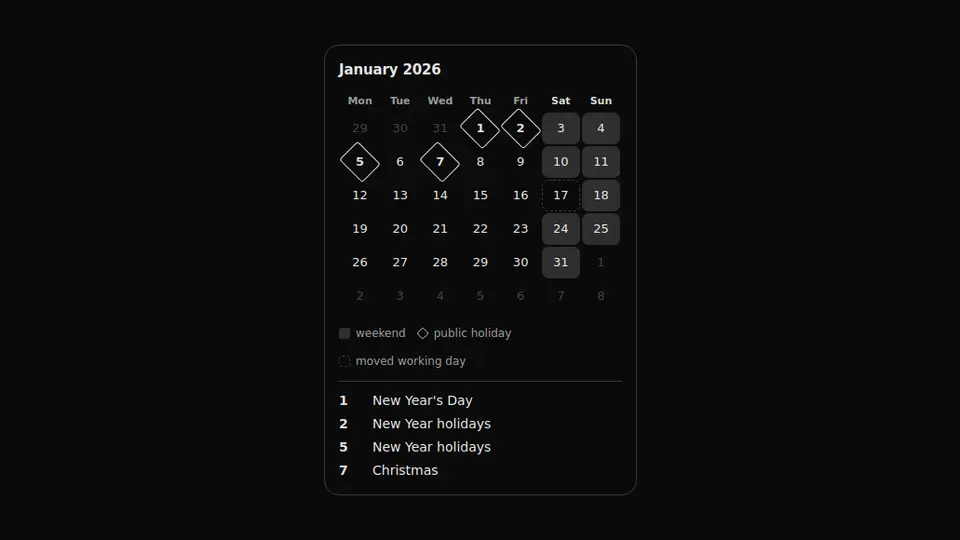
A month where a weekend, a public holiday and a moved working day differ in shape: a fill, a diamond around the number and a dashed border.
React + Tailwind, shadcn-compatible: press “Copy for AI” and your Cursor or Claude Code agent installs it with the shadcn CLI.
What you can change
- the month and the year through month and year
- the holidays through holidays — a map of day number to name
- the moved working days through workdays
A link for your AI agent: preview, code and instructions.
Preview
Use it with AI
- 1. Copy the link.
- 2. Write to your agent in your own words and drop the link into the sentence.
- 3. The agent opens the link and installs the component from the registry.
put this on the home page as the hero:
https://vibeui.club/c/calendar-017?lang=en&theme=dark
Not sure where to paste it? Step-by-step guide
Show the full instructions
What the link says, spelled out. Use it when your agent cannot open links — paste this text instead.
Loading…
How to use
<Calendar017
  year={2026}
  month={1}
  holidays={{ 1: "New Year", 7: "Christmas" }}
  workdays={[17]}
/>
A sample call. The agent installs the component itself from the registry via the “Copy for AI” link.
Settings
- Month
month· default: 1- Year
year· default: 2026- Label language
locale· default: ru-RU- Accent
accent· default: theme colour- Surface
background· default: theme colour
More in Calendar
FAQ
- How do I add Holiday Shapes with Cursor or Claude Code?
- Press “Copy for AI” on this page and paste it into your agent's chat. The instruction contains the shadcn CLI install command, the dependencies and what to keep, so the agent installs this exact component instead of recreating a lookalike.
- What does Holiday Shapes depend on?
- No npm packages beyond React and Tailwind CSS.
- What can I change in Holiday Shapes?
- Adapt: the month and the year through month and year; the holidays through holidays — a map of day number to name; the moved working days through workdays. Keep as installed: the local --vibeui-calendar-017-* palette — with foreign tokens the block stops matching the preview; encoding by shape rather than colour alone: colour is indistinguishable under colour blindness and in black-and-white print; rotating the pseudo-element, not the cell: a rotated cell lays the digit on its side.
- Is Holiday Shapes free?
- Yes. The preview is open without an account; with a free account you can copy up to 20 components a month.
For developers
npx shadcn@latest add https://vibeui.club/r/pro/calendar-017.jsonThis command needs a signed link: sign in and open “Component source” below — it issues a working link valid for 30 minutes. All install options
Technical notes
A server component: the holidays arrive in the holidays dictionary, the moved working days in the workdays array, there is no state. The main technique is encoding by the type of shape rather than by colour alone: a weekend gets the cell filled, a holiday a diamond drawn with a pseudo-element rotated by forty-five degrees, a moved day a dashed border. The number inside the diamond stays upright, because it is the pseudo-element that is rotated, not the cell: rotating the cell would lay the digit on its side. Such a month reads the same under colour blindness and in black-and-white print. Below the grid stand a legend using the same shapes and a list of holidays with their names — a shape without a caption still does not explain what kind of day it is.
Tags
- calendar
- holidays
- legend
- a11y
Component source
The same file your agent installs. Here in case you would rather copy it by hand.
Loading…