Input
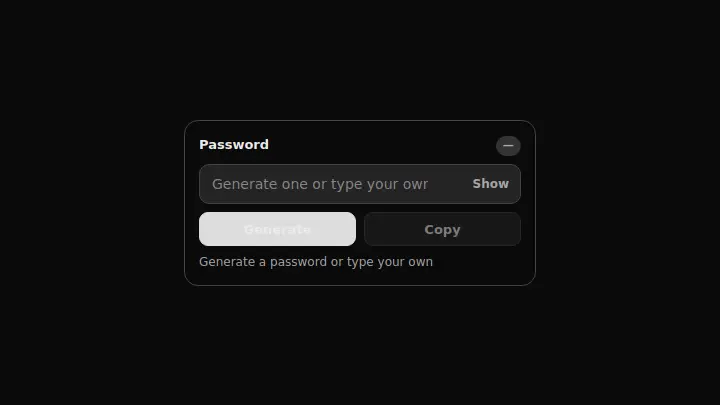
Password Generator with Entropy
A password field that generates a random string on click, copies it to the clipboard, and scores it in bits of entropy instead of a colored meter.
React + Tailwind, shadcn-compatible: press “Copy for AI” and your Cursor or Claude Code agent installs it with the shadcn CLI.
What you can change
- the label and placeholder copy, and the starting length
- the character sets in POOLS for your password policy
- the accent through the accent prop
A link for your AI agent: preview, code and instructions.
Preview
Use it with AI
- 1. Copy the link.
- 2. Write to your agent in your own words and drop the link into the sentence.
- 3. The agent opens the link and installs the component from the registry.
put this on the home page as the hero:
https://vibeui.club/c/input-016?lang=en&theme=dark
Not sure where to paste it? Step-by-step guide
Show the full instructions
What the link says, spelled out. Use it when your agent cannot open links — paste this text instead.
Loading…
How to use
<Input016
  label="Account password"
  length={16}
  onChange={(value) => setPassword(value)}
/>
A sample call. The agent installs the component itself from the registry via the “Copy for AI” link.
Settings
- Label
label· default: Password- Field hint
placeholder· default: Generate one or type your own- Generated length
length· default: 14- Accent
accent· default: theme colour- Background
background· default: theme colour
More in Input
FAQ
- How do I add Password Generator with Entropy with Cursor or Claude Code?
- Press “Copy for AI” on this page and paste it into your agent's chat. The instruction contains the shadcn CLI install command, the dependencies and what to keep, so the agent installs this exact component instead of recreating a lookalike.
- What does Password Generator with Entropy depend on?
- No npm packages beyond React and Tailwind CSS.
- What can I change in Password Generator with Entropy?
- Adapt: the label and placeholder copy, and the starting length; the character sets in POOLS for your password policy; the accent through the accent prop. Keep as installed: the local --vibeui-input-016-* palette — do not swap it for your theme tokens; generation through crypto.getRandomValues with a Math.random fallback — one character per class plus a Fisher–Yates shuffle so the guaranteed characters do not settle at the start of the string; the worded bits-of-entropy score instead of a filled meter — that kind of indicator is already taken in the catalog (input-003, input-011).
- Is Password Generator with Entropy free?
- Yes. The preview is open without an account; with a free account you can copy up to 20 components a month.
For developers
npx shadcn@latest add https://vibeui.club/r/pro/input-016.jsonThis command needs a signed link: sign in and open “Component source” below — it issues a working link valid for 30 minutes. All install options
Technical notes
The component is self-contained: one file, no dependencies, its own palette in local variables --vibeui-input-016-*. A client component: "use client". The generation takes one character from each class (lowercase, uppercase, digits, symbols), fills the remainder from the shared pool through crypto.getRandomValues (with Math.random as the fallback) and shuffles the result with Fisher–Yates. Instead of a bar, the score is given in bits of entropy: length multiplied by log2 of the size of the alphabet used.
Tags
- input
- password
- generator
- security
Component source
The same file your agent installs. Here in case you would rather copy it by hand.
Loading…