Input
Domain Tab Complete
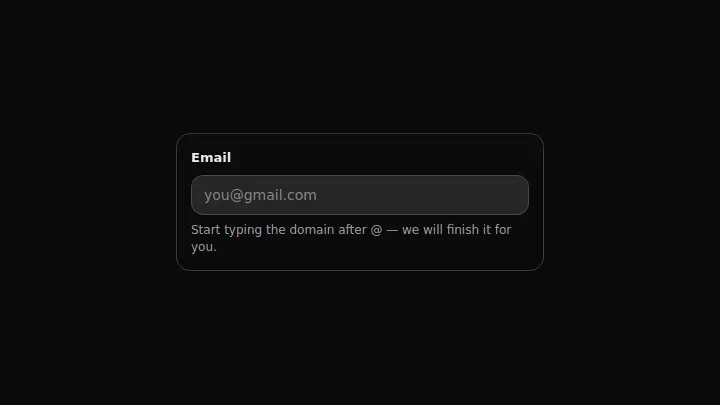
An email field that suggests the domain: after @, the rest of a popular domain (gmail.com, yandex.ru and others) appears in grey, and Tab accepts it instead of moving to the next field.
React + Tailwind, shadcn-compatible: press “Copy for AI” and your Cursor or Claude Code agent installs it with the shadcn CLI.
What you can change
- the label copy and the starting defaultValue
- the domains array — your own popular domains instead of generic mail providers
- the accent through the accent prop
A link for your AI agent: preview, code and instructions.
Preview
Use it with AI
- 1. Copy the link.
- 2. Write to your agent in your own words and drop the link into the sentence.
- 3. The agent opens the link and installs the component from the registry.
put this on the home page as the hero:
https://vibeui.club/c/input-024?lang=en&theme=dark
Not sure where to paste it? Step-by-step guide
Show the full instructions
What the link says, spelled out. Use it when your agent cannot open links — paste this text instead.
Loading…
How to use
<Input024
  label="Work email"
  domains={["acme.com", "gmail.com"]}
  onChange={(value) => setEmail(value)}
/>
A sample call. The agent installs the component itself from the registry via the “Copy for AI” link.
Settings
- Label
label· default: Email- Value
defaultValue- Accent
accent· default: theme colour- Background
background· default: theme colour
More in Input
FAQ
- How do I add Domain Tab Complete with Cursor or Claude Code?
- Press “Copy for AI” on this page and paste it into your agent's chat. The instruction contains the shadcn CLI install command, the dependencies and what to keep, so the agent installs this exact component instead of recreating a lookalike.
- What does Domain Tab Complete depend on?
- No npm packages beyond React and Tailwind CSS.
- What can I change in Domain Tab Complete?
- Adapt: the label copy and the starting defaultValue; the domains array — your own popular domains instead of generic mail providers; the accent through the accent prop. Keep as installed: the local --vibeui-input-024-* palette — do not swap it for your theme tokens; the invisible text twin under the field — it is what gives the hint a literal width match with the typed text, not approximate positioning; intercepting Tab with preventDefault only when a hint exists — otherwise keyboard navigation breaks for every other field on the form.
- Is Domain Tab Complete free?
- Yes. The preview is open without an account; with a free account you can copy up to 20 components a month.
For developers
npx shadcn@latest add https://vibeui.club/r/pro/input-024.jsonThis command needs a signed link: sign in and open “Component source” below — it issues a working link valid for 30 minutes. All install options
Technical notes
The component is self-contained: one file, no dependencies, its own palette in local variables --vibeui-input-024-*. A client component: "use client". The hint is not separate text but a literal continuation of the typed word: under the real input lies an invisible twin in the same font where the typed part is hidden (visibility:hidden) and the suffix is shown in a muted colour — that is how the letters match in width without measuring. Tab is intercepted with preventDefault only when a hint exists, otherwise it behaves as usual.
Tags
- input
- autocomplete
- keyboard
Component source
The same file your agent installs. Here in case you would rather copy it by hand.
Loading…